Nomination fees for honshimei (a guest's own nominated cast member) and jounai (in-house nominations), dohan (arriving at the club together with a guest), extensions, bottles: we build in your prices and your back (commission) rates exactly as your store has them now. Keep your current register and just enter the slips after business hours, or run everything from the table map to checkout and register close on one system. Both use the same Store Portal at the same price. Lounges can use it the same way.
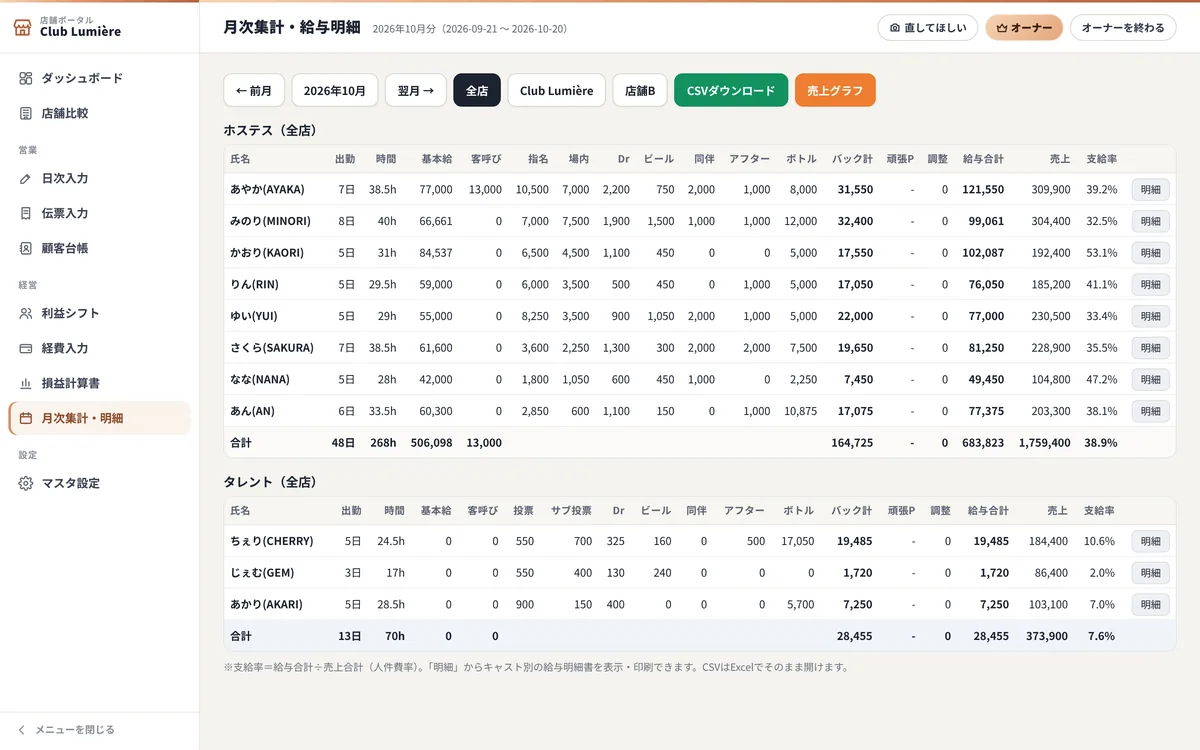
Back for honshimei, jounai, dohan and bottles is worked out from the slips automatically
On closing day, a payslip for each cast member is ready
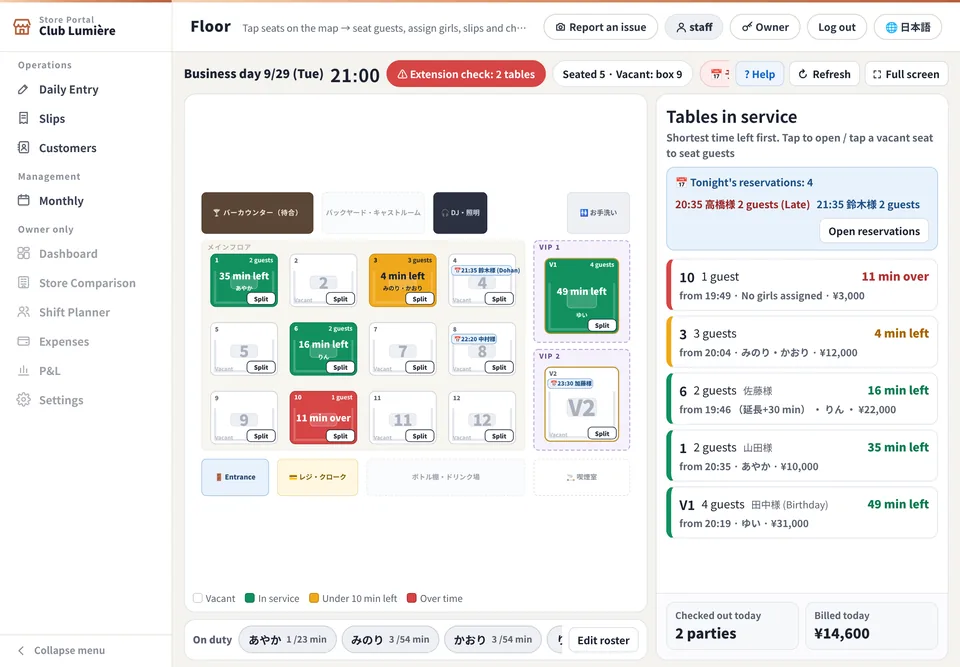
The table map helps you not to miss extension calls
Works with the register you have now
Good for
Stores where back differs between honshimei and jounai
Stores with many dohan, extensions and bottles
Stores that spend hours on calculations before closing day
Stores with many box seats and cast rotating between tables
Common pricing and back problems at kyabakura (hostess clubs)
The more kinds of nominations you have, and the more detailed your back rules, the more places a ready-made register won't fit. Whatever doesn't fit is left as hand calculation after closing.
Honshimei and jounai are counted differently
Honshimei has a higher nomination fee and a higher back; jounai has its own rate. And how to split when two honshimei cast members sit with one group is something the register can't take.
Forgetting to ask about extensions
On a packed Friday night, you lose track of how many minutes each table has left. An extension nobody asked about is sales lost.
Hours on the calculator before closing day
Hourly pay, plus back for honshimei, jounai, dohan, drinks and bottles, minus the daily pay advances already handed out. Repeated once for every cast member.
Answering "How much this month?" every time
How many nominations, how many bottles. Every time a cast member asks, the manager flips through the slips to find out.
Kyabakura pricing and pay rules we can build in
At the first consultation, show us your current price list, slips and pay rules, and we build everything exactly that way (fully custom-built). You don't have to change your store's rules to fit the register. For example:
Set fees (by time and number of guests)
Extensions (every how many minutes, at what price)
Nomination fees for honshimei and jounai
Dohan fees and back
Drinks, bottles and food
The order in which tax and service charge are applied
Rounding rules, such as to the nearest ¥100
Card fees, QR payments, split payments and coupon discounts
Hourly or daily wages, and commission-only pay with no hourly wage
How to split when two honshimei cast members sit with one group, and equal splits for jounai
Back rates for nominations, dohan, drinks and bottles
Closing day (the 20th or the end of the month), pay day and daily pay advances
Closing-day calculations are done the moment the slips are in
Honshimei, jounai, dohan, drinks and bottles entered on the slips become each cast member's sales and back as they are. How to split when two honshimei cast members sit with one group, and how to split equally when only jounai is involved, are set by your store's rules.
Hourly (or daily) wages plus back and adjustments: on closing day, a payslip comes out for each cast member. Daily pay advances you have handed out can be taken off as an adjustment. Withholding tax is calculated at the rate you set, and you can choose how rounding is handled (please check the handling with your tax accountant). Closing day can be the 20th or the end of the month.
Pay and the store's profit open only when someone has entered with the owner PIN. In "Monthly", the manager and floor staff can see back and sales, but no further. For how the calculation works, see Pay and back calculation.
"Monthly" and payslips
From the table map: extension calls through to checkout
We build the table map from your floor plan. Tap an empty box seat to seat a group: just choose the number of guests, the set time and the cast members to sit with them. Moving tables, splitting a box seat, shared tables and rotating cast between tables are all done on the spot. Dohan reservations go into the reservation book, and if you assign a table in advance, it shows on the table map too.
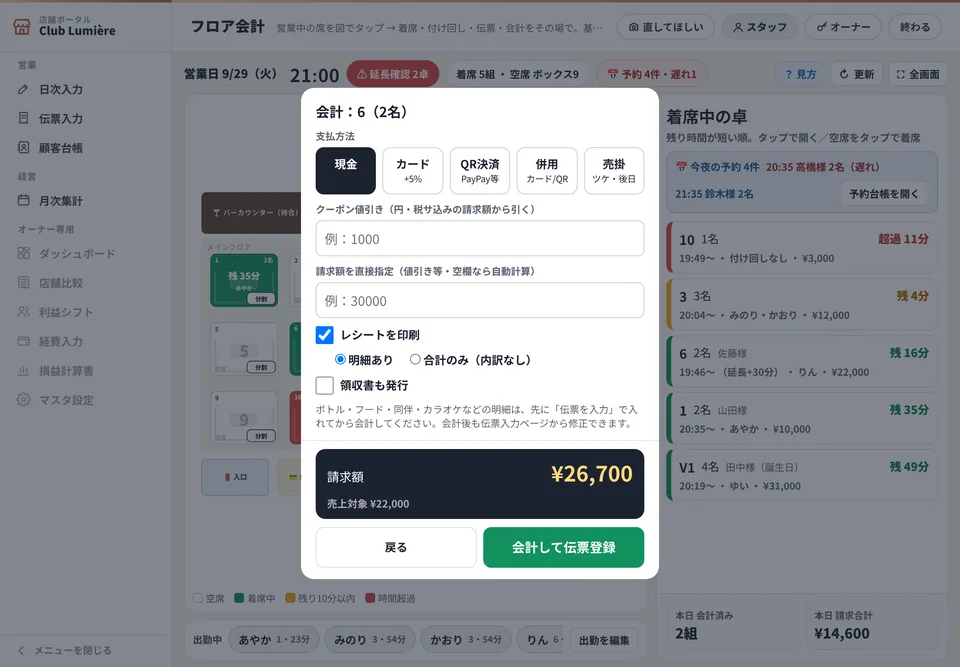
Time left is shown by color (yellow = ending soon, red = over time). Enter an extension on the slip, and the end time moves automatically. Checkout is done from the table itself. Receipts and formal receipts print on the spot, and everything flows from the slips through to register close after closing and the daily sales report. See Floor view and Register close and daily sales report for details.
Checkout from the Floor view
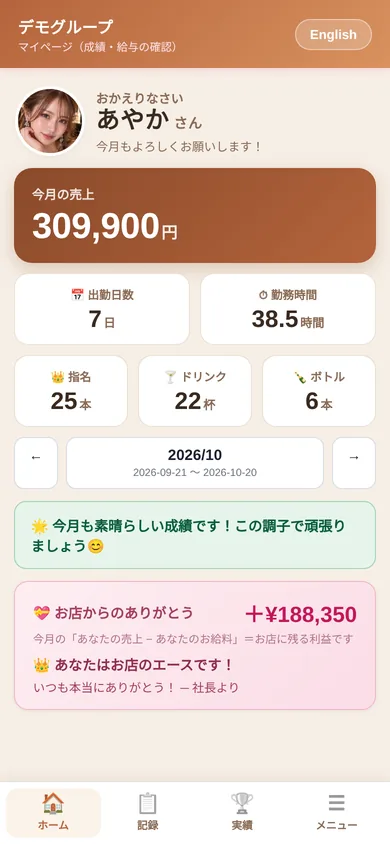
Cast members see their own numbers on their own phones
This month's sales, days worked, nominations, drinks and bottles, together with a day-by-day record, available on their own phones any time. They also get the badges they have earned, how far they are from the next goal, the sales ranking (the top three and their own place) and "thank you" cards from the store.
Each cast member enters with her own PIN. She cannot see other cast members' sales or pay, or the store's profit. The page can be switched between Japanese and English, and once added to the home screen it opens like an app. See Cast My Page for details.
Cast My Page
Ask us whether it can work the way your store does.
Keep your current register, or run everything from the table map to checkout
Store Portal can leave your current POS register and the way you do checkout as they are. Just enter the slips after business hours, and sales, back, pay, P&L and the owner's numbers are all worked out automatically. It runs on the phones, iPads and PCs you already have, and the setup fee is ¥0.
It can also run the whole store on one system: the table map during business hours, checkout, receipts and formal receipts, register close, tabs (credit) and the daily sales report. These are included in every plan, so changing how you use it does not change the price.
Whichever you choose, the owner's phone shows this month's sales so far, operating profit and labor cost rate. Enter who is scheduled to work, and you also see "today's required sales" based on today's labor cost ("Shift Planner"), a guide for deciding how many cast members to call in. See P&L, owner dashboard and Shift Planner for details.
Pricing for kyabakura
Pricing depends only on store size (from small to extra-large), and the features are the same in every plan. Size is not decided by store type alone; we settle it at the consultation. Stores with more than one floor or special requirements are quoted individually.
Store Portal
Every feature. Priced only by store size
Small
Monthlyfrom ¥9,800(tax incl.)
Setup fee¥0
Small-to-medium
Monthly¥22,000(tax incl.)
Setup fee¥0
Medium-to-large
Monthly¥33,000(tax incl.)
Setup fee¥0
Larger stores
Large¥44,000
Extra-large¥55,000
a month, tax incl.
No app to install. It runs in the browser on your phone or computer
On every plan, the setup fee is ¥0. Try it for a month; if it doesn't fit, you pay nothing. The first month is the time to try it and for us to build your settings. If you continue, the monthly fee starts from month 1.
All prices include tax.
The first month is the time to try it and for us to build your settings. If it doesn't fit, you pay nothing; if you continue, the monthly fee starts from month 1.
The setup fee is ¥0 on every plan.
For small stores, only at the start of the contract, the monthly fees for months 1 to 3 are paid together in advance (monthly after that).
Ask us whether it can work the way your store does.
QWhen two honshimei cast members sit with one group, how are the sales split?
A
They are split by your store's rules. You can set a different share for the cast member who was nominated first and the one who joined later, or an equal split. The same goes for jounai-only cases. We ask about your current rules at the consultation and build them in as they are.
QAre extensions calculated automatically?
A
Yes. Enter an extension on the slip and it goes into the bill according to your price list. The end time is also worked out from the number of extensions, and the color on the table map changes.
QCan we use only the back and pay calculation, without changing our register?
A
Yes. Keep your current register and just enter the slips after business hours, and each cast member's sales, back and payslip, right through to the P&L, are put together. The setup fee is ¥0, and you can start on the phones, iPads and PCs you already have.
QHow much can the manager and floor staff see?
A
The staff PIN opens "Slips", "Daily Entry", the customer book, the table map and register close. In "Monthly", staff see back and sales, but no further. Pay, P&L and the owner's numbers open only with the owner PIN. A screen left open closes by itself after a while without being touched.
QCan lounges use it too?
A
Yes. The way your mama-san and chi-mama work, and your rules for dohan and bottles, can all be built in as they are. For lounges and clubs, see the Clubs and lounges page.