Store Portal店舗ポータル 日本語

Snack bars & bars

Even on your own,start from a single phone:a POS system for snack bars and bars.

The travel fee is free for the first visit only.

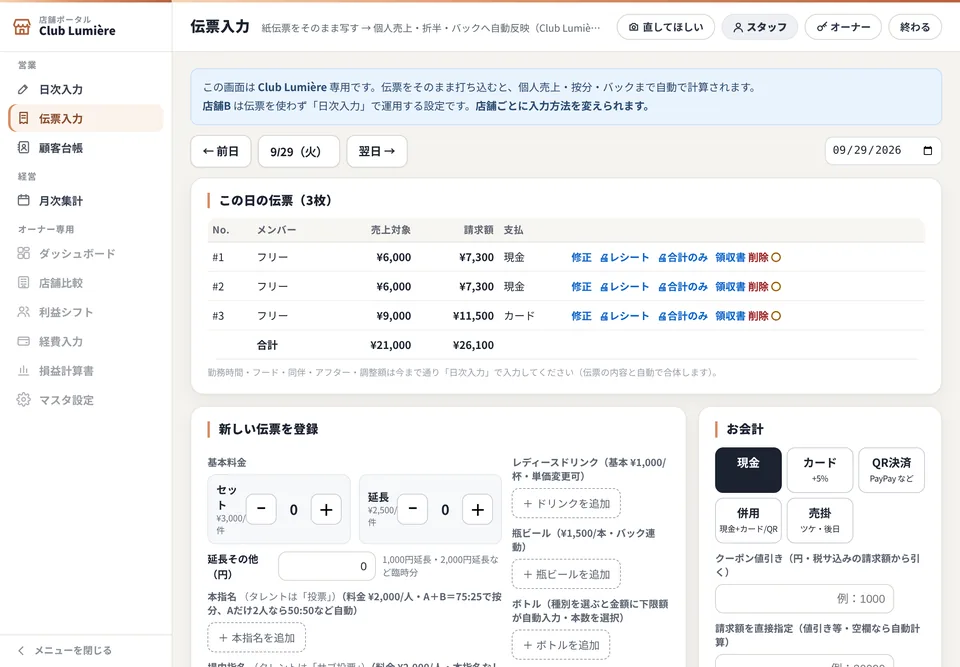
Charge, sets, karaoke and bottles go onto the slip as items, exactly as on your price list. No app to install: in the browser on the phone you already use, you get slips, sales totals and bottle keep. Keep your current register, or print receipts and formal receipts too: Store Portal is from ¥9,800 a month at the small size, with a ¥0 setup fee (tax included; if you print receipts, the receipt printer is bought or rented separately).

  • No app needed. One mama-san, one phone is enough
  • Charge and karaoke, exactly as on your price list
  • Whose bottle is it, and when does it expire? The customer book tells you at once
  • Keep your current register: from ¥9,800 a month, ¥0 setup fee (tax incl.)

Good for

  • Bars run by a mama-san or master on their own
  • Small bars that are mostly counter seats
  • Bars with a lot of bottle keep
  • Bars that still write formal receipts by hand
"Slips" screen: items for set, extension, drinks, bottles and kept bottles, and the payment method at checkout (demo screen)

Demo screens are shown in Japanese. Stores can switch their screens to English on each device.

Where a snack bar or bar runs out of hands

The smaller the team, with a mama-san or master running the bar alone, the heavier the counting and record-keeping after closing. A big register system is more than you need. But you still want the numbers to add up.

  • Closing up with a notebook and a calculator

    Add up the slips, count the cash in the register, write it in the notebook. Done alone after closing, it pushes your way home later and later.

  • Not knowing whose bottle is on the shelf

    When was this bottle opened, and when does it expire? Flipping through the notebook, the answer doesn't come quickly in front of the customer.

  • Not sure how much is left at the end of the month

    You roughly know your sales. But how much is left after rent, stock and wages, you don't know until the end of the month.

  • Writing formal receipts by hand every time

    Every time a business customer asks, you write the addressee and the purpose line by hand. The busier it is, the longer the customer waits.

What works just as it is on your snack bar or bar price list

Show us your current price list, and we build the items and the calculations exactly as they are. Because everything is fully custom-built around your prices and pay rules, you never have to change your prices to suit the register. For example:

  • Charge and set fees
  • All-you-can-drink time and extensions
  • Karaoke charges
  • Bottles (at the prices on your list)
  • Bottle keep charges
  • Drinks for the mama-san and staff
  • Food and snacks
  • Tax, service charge and rounding
  • QR payments, card (fee included) and split payments
  • Staff hourly wages, daily pay advances and drink back (commission per drink)
  • Pay closing day and pay day

Bottle keep and customers in one book

For each customer you can keep their company, birthday and the bottles they keep (brand, shelf and expiry). Customers whose bottle is about to expire, or whose birthday is coming up, can be filtered with one button, giving you a reason to get in touch.

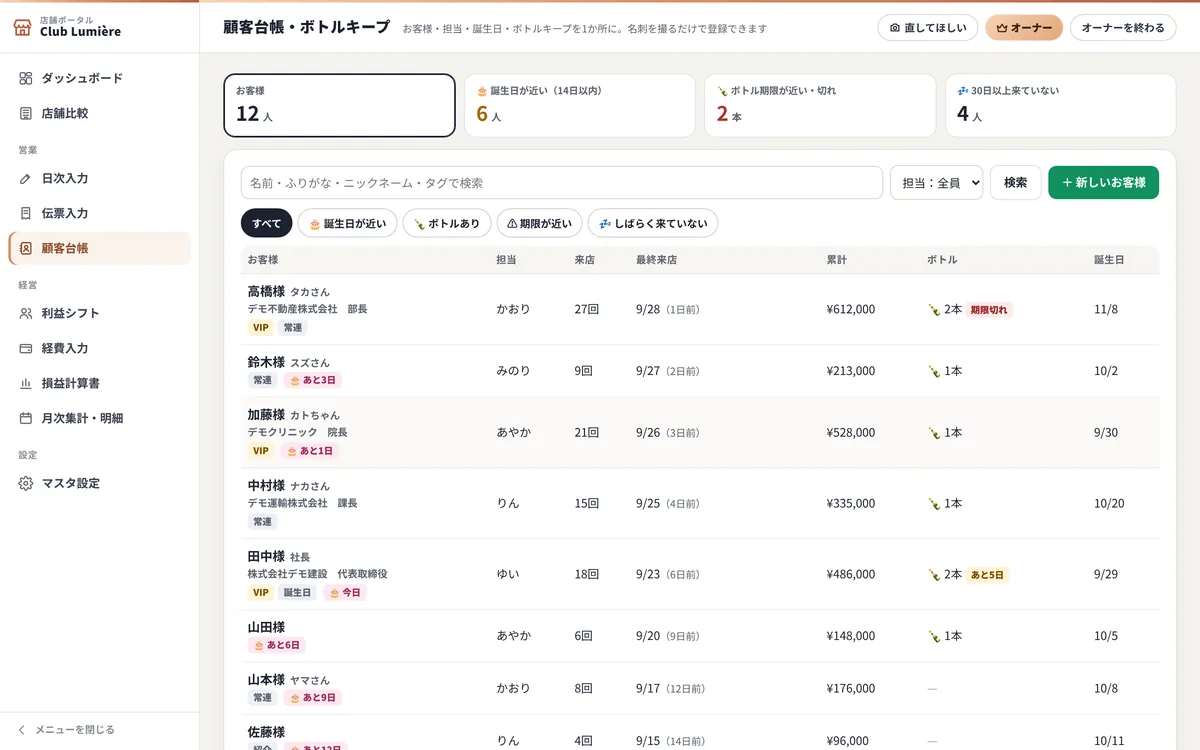
For a new customer, just take a photo of their business card with your phone. The name, company and phone number are read and filled in (business card reading). If you choose the customer at checkout on the table map, the number of visits and the date of the last visit are recorded automatically, so you can also filter for customers who "haven't been in for a while". See Customer book and bottle keep for details.

Customer book: list of customers with company, cast in charge, visits, bottle keep and birthday (demo screen)
Customer book and bottle keep

How much is left this month, on the mama-san's phone

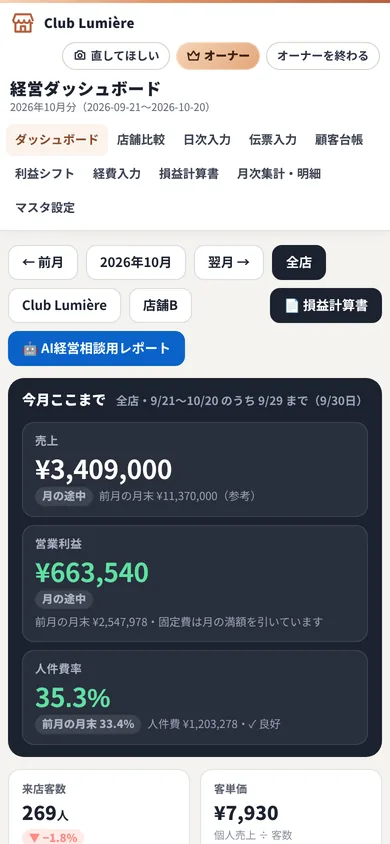
Enter the slips after business hours, and this month's sales so far, number of guests and sales per guest are totaled automatically. Enter expenses such as rent and stock, and you also get operating profit and the labor cost rate, with a comparison to last month.

The P&L (profit and loss statement) comes out in a print-ready form. There is also an "AI consultation report", a text summary of your numbers that you can paste into an AI to ask for advice. Even where there is no signal, you can look at the numbers saved on the owner's phone (viewing only). No app is needed; add it to your home screen and it opens with one tap. See P&L and owner dashboard for details.

Owner dashboard on a phone: this month's sales so far, operating profit and labor cost rate (demo screen)
Owner dashboard (on the owner's phone)

If you want receipts, formal receipts and register close too

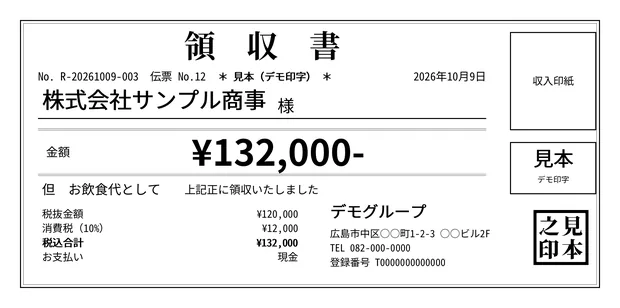
A receipt prints at every checkout, and business customers get a landscape formal receipt on the spot. It carries the addressee (with the corporate suffix before or after the company name), the purpose line, the amount before tax and the consumption tax, and the invoice registration number; the revenue stamp box appears only when needed. No more handwriting.

At register close after closing, today's sales are already lined up from the slips, split into cash, card, QR and tabs (credit), so you only enter the number of bills and coins. You see at once whether it balances, and by how much it is off. Once closed, the A4 daily sales report prints or saves as a PDF. The price is the same as when you keep your current register. See Register close and daily sales report for details.

Sample landscape formal receipt: addressee, purpose line, amount before tax and consumption tax, and invoice registration number (demo printout)
Formal receipt

Ask us whether it can work the way your store does.

Pricing for snack bars and bars

Pricing depends only on store size (from small to extra-large), and the features are the same in every plan. Size is not decided by store type alone; we settle it at the consultation. Whether you keep your current register or bring checkout and register close into the same system, the price stays the same.

Store Portal

Every feature. Priced only by store size

Small

Monthlyfrom ¥9,800(tax incl.)

Setup fee¥0

Small-to-medium

Monthly¥22,000(tax incl.)

Setup fee¥0

Medium-to-large

Monthly¥33,000(tax incl.)

Setup fee¥0

Larger stores

  • Large¥44,000
  • Extra-large¥55,000

a month, tax incl.

No app to install. It runs in the browser on your phone or computer

On every plan, the setup fee is ¥0. Try it for a month; if it doesn't fit, you pay nothing. The first month is the time to try it and for us to build your settings. If you continue, the monthly fee starts from month 1.

  • All prices include tax.
  • The first month is the time to try it and for us to build your settings. If it doesn't fit, you pay nothing; if you continue, the monthly fee starts from month 1.
  • The setup fee is ¥0 on every plan.
  • For small stores, only at the start of the contract, the monthly fees for months 1 to 3 are paid together in advance (monthly after that).

How a small bar gets started

  1. 1

    Show us your price list

    At the consultation, we ask about your current price list and how you keep slips and bottle keep. We build it exactly that way.

  2. 2

    Try it on your phone for the first month

    This is the time to try it and for us to build your settings (¥0 if it doesn't fit). For a while, run it alongside your paper slips or notebook and compare the numbers.

  3. 3

    Once you're used to it, add things bit by bit

    If you hire staff, hourly wage and back rules can be added later. If you come to want receipts and formal receipts, you can do checkout in Store Portal too (the price stays the same). To change anything, just send a photo and a few words from the top right of the screen you are using. For urgent problems, just call us.

Ask us whether it can work the way your store does.

FAQ

QCan we use it as a snack bar register app, on a phone only?
A

Yes. It runs in the phone's browser, with no app to install. From slip entry, sales totals, bottle keep and P&L to printing receipts and formal receipts and register close, it is all in Store Portal. You can keep your current register too. Pricing depends on store size; at the small size it is from ¥9,800 a month (tax included).

QCan a small bar with just one mama-san use it?
A

Yes. One person can use it from one phone. Just enter the slips after business hours, and your sales and P&L are put together. When you hire staff, hourly wage and drink back rules can be set up later.

QCan we find customers whose bottle is about to expire?
A

Yes. In the customer book, you can filter for customers whose bottle is about to expire or has expired. You can also find customers whose birthday is coming up. The "haven't been in for a while" filter comes from the visit records made when you choose the customer at checkout on the table map.

QCan our own charges, like charge and karaoke, be included?
A

Yes. Charge, sets, karaoke, all-you-can-drink and the other items on your current price list are built into the slip as they are. Tax and service charge, and rounding such as to the nearest ¥100, are calculated by your store's rules.

QCan we issue formal receipts for business customers?
A

Yes. You can print a landscape formal receipt. It carries the addressee (with the corporate suffix before or after the company name), the purpose line, the amount before tax and the consumption tax, and the invoice registration number. The revenue stamp box appears only when needed (please check how to handle revenue stamps with your tax accountant).

Can your price list and pay rules go in exactly as they are?
Just ask us.

Try it for a month; if it doesn't fit, you pay nothing. Anyone can try the demo right now (staff 1111 / owner 9999).