With Store Portal, you can keep your current register and enter the slips after business, or manage tables during business, take payments, print receipts and close the register, all in one system. Both are the same plan. The features are the same at every size, and the price depends only on your store size (from small to extra-large).
Keep your register or bring it in: the same plan
The same features at every size
The price depends only on store size
Start with your current register, and move checkout here later if you like
A one-line summary and the stores it suits. The monthly fee depends on your store size (tax included).
Keep your register, or bring the register in too
Store Portal
Every feature. Priced only by store size
Keep your current register and just enter the slips after closing, or run tables, checkout, receipts and register close here too. Either way, sales, back, pay, P&L and your business figures all follow automatically.
You want to start without replacing your register
You want to stop spending hours on back and pay after closing
You want one system, from checkout to register close
You want to see sales, labor cost and profit every day
Smallfrom ¥9,800a month (tax incl.)
Small-to-medium¥22,000a month (tax incl.)
Medium-to-large¥33,000a month (tax incl.)
Larger stores
Large¥44,000
Extra-large¥55,000
a month, tax incl.
Setup fee ¥0 · ¥0 if the first month doesn't fit · the same features at every size.
No app to install. It runs in the browser on your phone or computer
Your current register and the way you take payments can stay as they are: just enter one slip per group after business, and sales, back (commission), pay, P&L and your business figures all follow automatically.
You can also bring the register side into Store Portal: work from the table map, from seating to checkout, print receipts and formal receipts, and close the register after closing. The slips you checked out become your sales, pay and P&L as they are.
Either way, the plan and the price are the same. It is made to match your store's pricing and pay rules (fully custom-built).
A day with Store Portal: enter the slips after closing
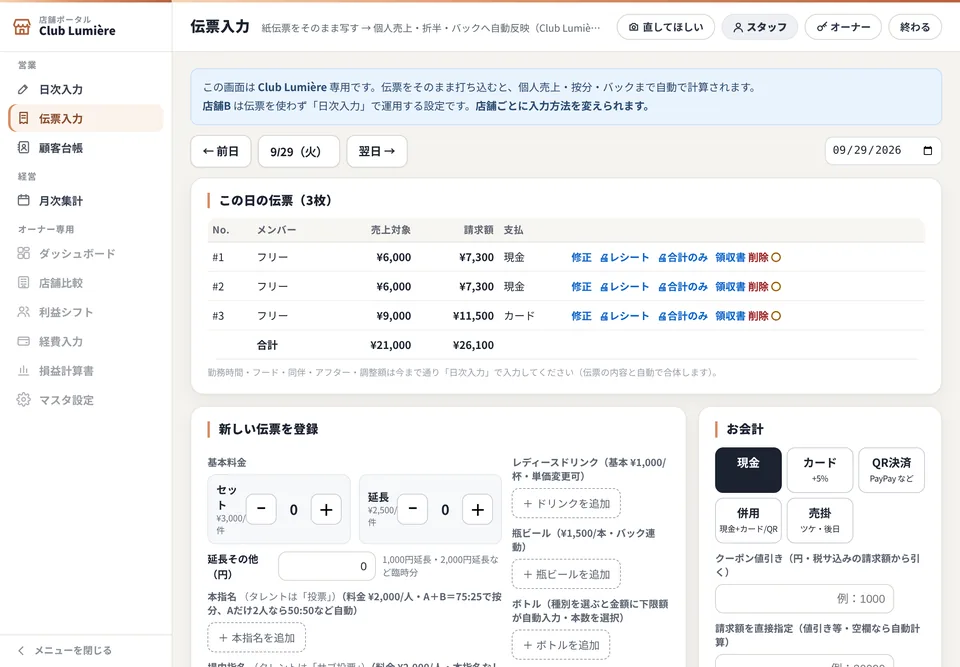
During business, nothing changes. You check out on your current register, and your slips can stay in the form they are now. After closing, you enter them into Store Portal, one slip per group. Choose set, extension, nominations (honshimei and in-house jounai), dohan (arriving at the club together with a guest), drinks, bottles and food, then enter the number of guests and the payment method (cash, card, QR payment or a mix). The amount due comes out automatically, exactly as in your price list.
Along with that, in "Daily Entry" you enter the number of guests and groups, and each cast member's start and finish times (just pick them from a drop-down). That is all for the day.
Slip entry
A day with Store Portal: the rest follows automatically
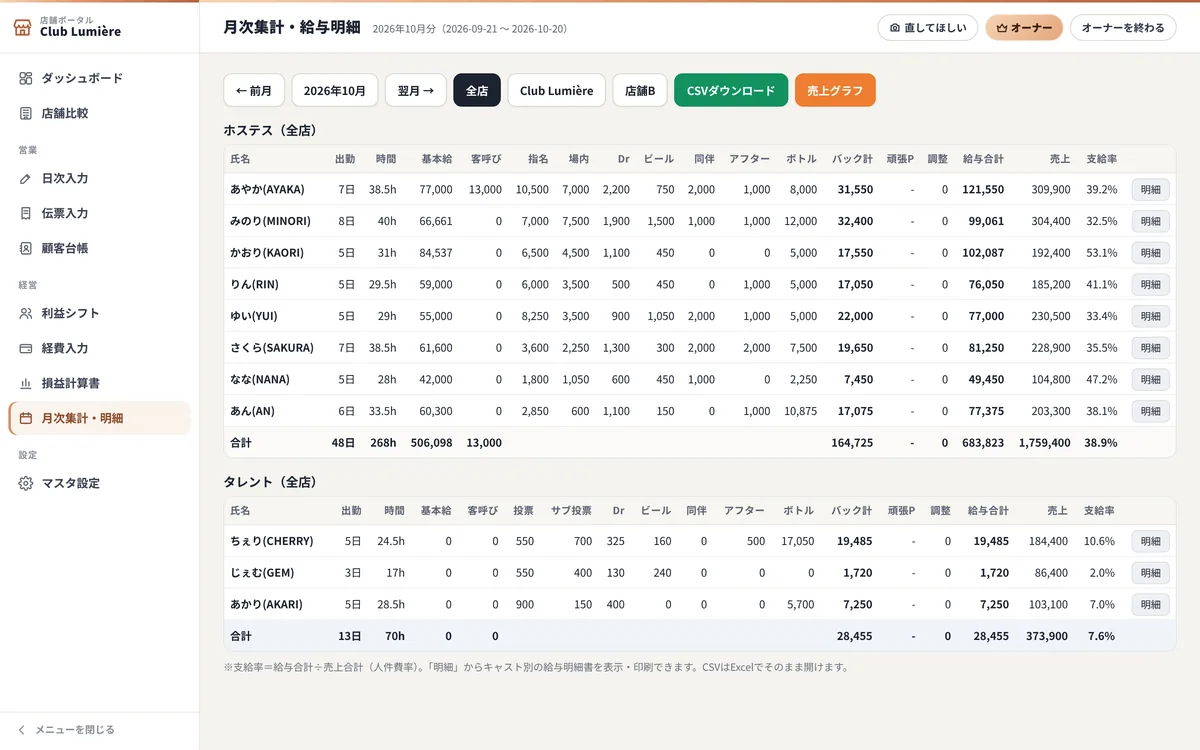
From the slips and working hours you entered, each cast member's sales and back, and their pay including hourly or daily wages, build up every day. On the closing day, the payslips are ready too. Daily pay advances are adjusted by your store's rules as well.
The owner's screen shows this month's sales so far, operating profit and labor cost rate, today's required sales ("Shift Planner") and the P&L. Cast members check their own figures on their own My Page. The time spent calculating after closing is gone. For details, see pay and back calculation and P&L and owner dashboard.
"Monthly" summary and payslips (opens with the owner's PIN)
Bringing the register in: the table map during business
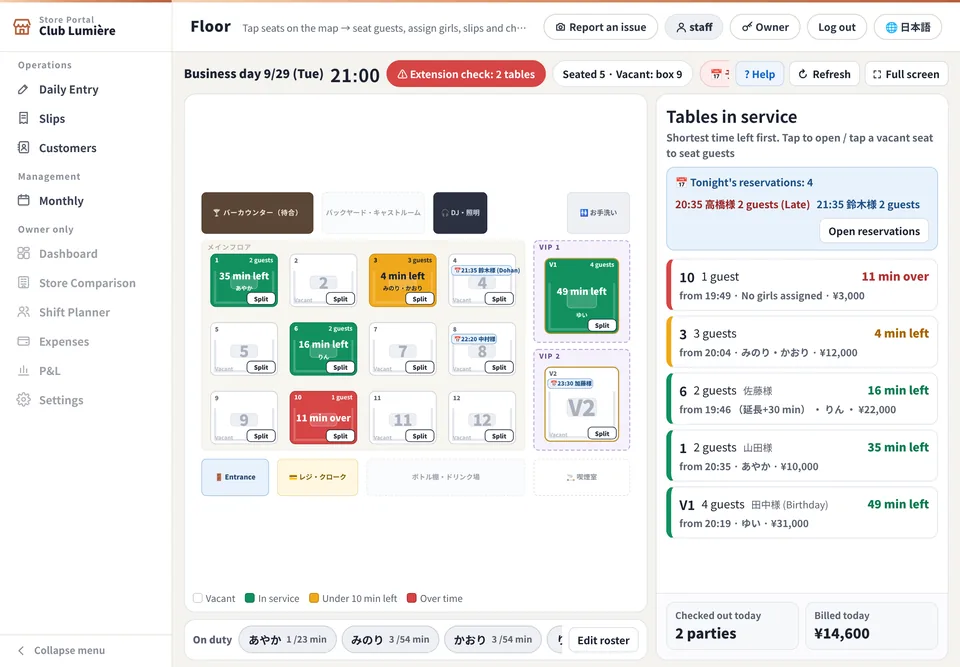
On a table map drawn from your floor plan, you see who is at which table and how many minutes are left. Tap an empty seat to seat guests, then choose the number of guests, the set time and the cast to assign. Moving tables, splitting a box seat, shared tables and rotating cast between tables can all be done on the spot.
Tables near the end of their time turn yellow, and tables past it turn red. Enter an extension on the slip, and the end time moves back automatically. Checkout is done from the table: choose cash, card, QR payment, a mix, or a tab (credit), and print the receipt and formal receipt right there. Reservations also appear on the table map. For details, see Floor view.
Floor view
Bringing the register in: register close after closing
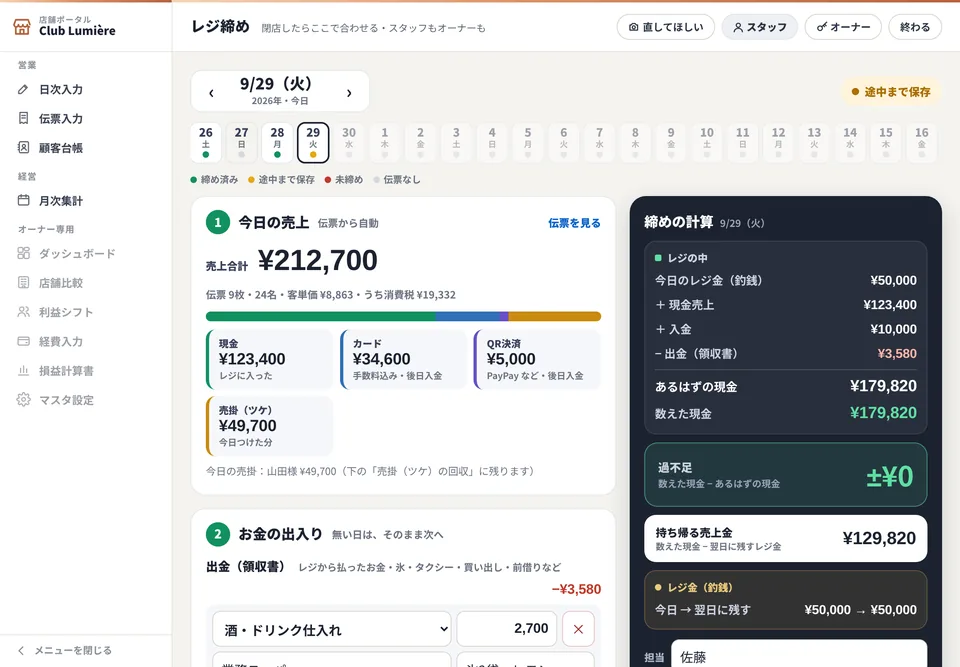
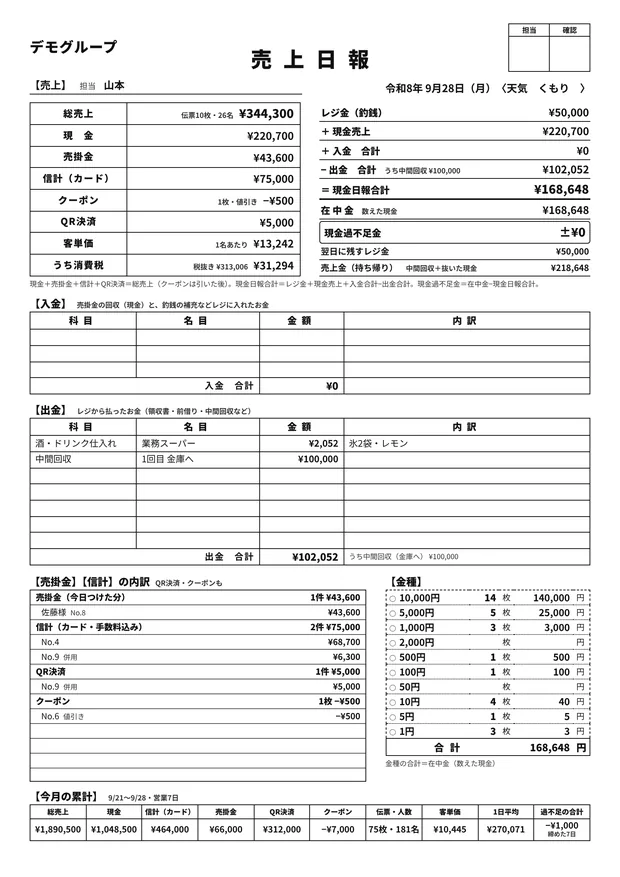
Today's sales are already filled in from the slips you checked out (cash, card, QR payments and tabs). Money taken out of the register goes in as a payout, with an expense category; change you add goes in as a pay-in. Enter the number of notes and coins, and the over/short shows right away. You can run the interim report (the check before closing) as many times as you like.
"Close (final settlement)" fixes the day's figures. Tab collections also go into that day's register close. The closed figures flow straight into sales, pay and P&L. No more nights of re-entering slips. For details, see register close and daily sales report.
Register close
Bringing the register in: what comes out on paper
Receipts come in two forms: itemized, or total only. Formal receipts are landscape and include the addressee (with the corporate suffix before or after the name), the purpose line, the amount before tax and the consumption tax, your registration number, a box for the revenue stamp and your company seal image. The final settlement (daily total plus running total) can be printed too.
The daily sales report is an A4 sheet laid out like a paper daily report. You can print it or save it as a PDF. You can also produce a monthly summary of the month's figures (A4 landscape), and a CSV that can be imported into Yayoi accounting software. Printouts are in Japanese.
Daily sales report (A4). Receipts, formal receipts and the final settlement can be printed too
What is included, and the price
A circle means it is included. Every size of the plan includes all of them. Tap a name to open that feature's page.
The price depends only on your store size. See the pricing page for details.
Which way of using it fits your store?
Here are three rules of thumb. All of them are the same plan. If you are not sure, we decide together at the consultation.
Keep your current register
You don't want to change your register or the way you take payments, and you don't want to buy a new one. But back, pay and the P&L after closing take up your time. Then start by keeping your register and entering the slips after business. You can begin on your own phone, iPad or PC.
One system for everything
You want one system from checkout to register close. You want the table map to stop missed extension calls. You want proper receipts, formal receipts and a daily sales report, and a list of uncollected tabs (credit). Then run checkout during business on Store Portal too.
If you are not sure
You can start with your current register and move checkout to Store Portal later. The plan and the price stay the same. During the first month's trial, you can try it alongside your current register before you decide.
Pricing
The price depends only on your store size. All prices include tax. For full details and notes, see the pricing page.
Store Portal
Every feature. Priced only by store size
Small
Monthlyfrom ¥9,800(tax incl.)
Setup fee¥0
Small-to-medium
Monthly¥22,000(tax incl.)
Setup fee¥0
Medium-to-large
Monthly¥33,000(tax incl.)
Setup fee¥0
Larger stores
Large¥44,000
Extra-large¥55,000
a month, tax incl.
Sales totals from slips
Pay and back calculation, with payslips
Owner dashboard, P&L and Shift Planner
Customer book, bottle keep and cast My Page
Floor view (table map and reservation book)
Checkout, receipt and formal receipt printing
Register close, tabs (credit) and the daily sales report
Monthly summary and import into Yayoi
Change requests from the screen you're using
No app to install. It runs in the browser on your phone or computer
On every plan, the setup fee is ¥0. Try it for a month; if it doesn't fit, you pay nothing. The first month is the time to try it and for us to build your settings. If you continue, the monthly fee starts from month 1.
All prices include tax.
The first month is the time to try it and for us to build your settings. If it doesn't fit, you pay nothing; if you continue, the monthly fee starts from month 1.
The setup fee is ¥0 on every plan.
For small stores, only at the start of the contract, the monthly fees for months 1 to 3 are paid together in advance (monthly after that).
Ask us whether it can work the way your store does.
No. Every plan includes slip entry, sales totals, pay and back, the P&L, the owner dashboard, "Shift Planner", cast My Page and the customer book, plus the floor view (table map), checkout, receipts and formal receipts, register close, tabs (credit) and the daily sales report.
QIf we keep our current register, won't we be entering everything twice?
A
You check out on your current register during business and enter one slip per group into Store Portal after closing, so yes, you enter things twice. But on the slip you only choose set, extension, nomination, drinks and so on, and the amount is calculated automatically. In return, the back, pay and P&L work after closing disappears. If you want to enter things only once, run checkout on Store Portal too (it is the same plan).
QCan we start with our current register and move checkout to Store Portal later?
A
Yes. The plan stays the same, so the price does not change. The slips and customer book you have entered so far stay as they are. We build your table map at that point.
QCan it print receipts and formal receipts?
A
Yes. Receipts (itemized or total only), formal receipts, register close and the daily sales report work on every plan. If you print them on your current register now, you can keep doing that too.
QCan a small store use the table map, checkout and register close?
A
Yes. The features are the same at every size, so even a small store (from ¥9,800 a month, tax included) can use the table map, checkout and register close. Store size is not decided by store type alone; we settle it with you at the consultation, based on how your store actually runs.