
Fully custom-built
Everything built to matchthe way your store works.
The travel fee is free for the first visit only.
With a ready-made register, you end up fitting your store to the register. Store Portal works the other way around. Show us your current price list, your pay and back (commission) rules and your slip format, and we build it exactly that way. Once you start using it, "I want this changed" is just a request from the screen you are using. Improvements to fit your store cost nothing extra.
- Your price list, tax and service charge order and rounding stay as they are
- Hourly wages, back, closing days and daily pay advances: your current rules, unchanged
- Slip and formal receipt formats, and the items on screen, in your store's form
- Changes after you start are just a request from the screen. No extra charge
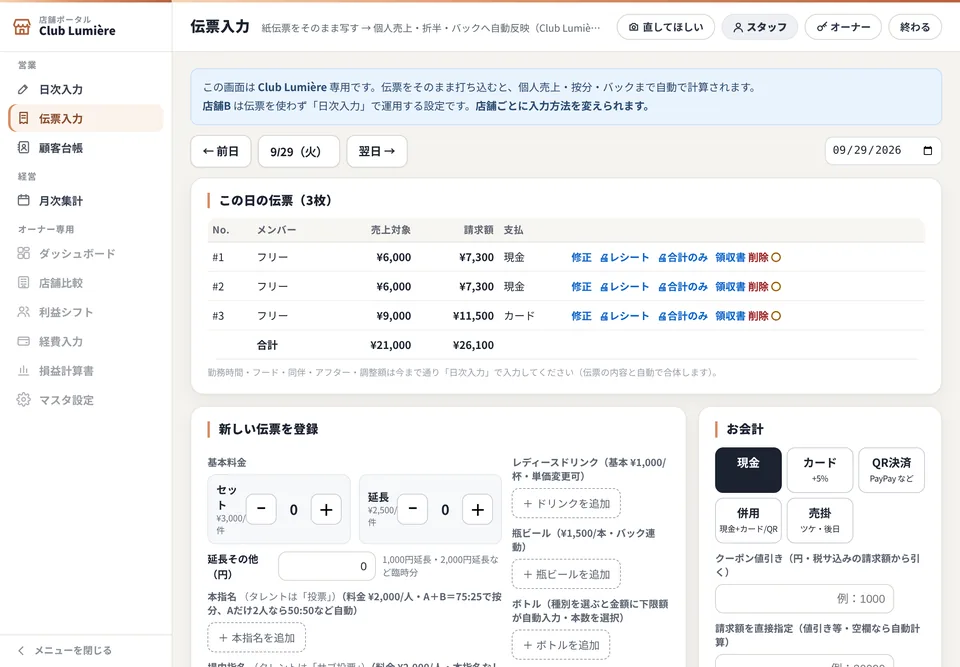
Demo screens are shown in Japanese. Stores can switch their screens to English on each device.
Having trouble with a ready-made register?
The more detailed your pricing and back rules, the more places a ready-made register doesn't fit. And whatever doesn't fit, someone ends up calculating by hand.
Your pricing rules won't go into the register
Set prices and extensions, honshimei and in-house nominations, dohan (arriving at the club together with a guest). The order in which tax and service charge are applied, and rounding to ¥100 units. Anything the register can't calculate gets added up again on a calculator.
Calculating by hand after closing
Back, pay and deductions for daily pay advances all happen outside the register. You leaf through the slips and type them into a spreadsheet again, and the night before the closing day is gone.
The slips don't match your store
The screen and the slips are full of items you never use. Names differ from what your store calls things, and staff get confused. The formal receipt format can't be changed either.
Asking for changes is a hassle
You changed a price, or a back rate. Each time, you explain it to a help desk and wait for a reply. The smaller the change, the longer it gets put off.
What we can build to match your store
At the first consultation, you show us your current price list, slips and pay rules, and we build it exactly that way. For example:
- Set prices (by time and number of guests)
- Extensions (every how many minutes, and how much)
- Honshimei and in-house nominations
- Dohan
- Drinks, bottles and food
- The order in which tax and service charge are applied
- Rounding rules, such as to ¥100 units
- Card fees, QR payments and split payments
- Hourly wages, daily wages and daily pay advances
- Back on nominations and bottles, and how it is split
- Closing day, pay day and payslips
- Slip and formal receipt formats
- The items shown on screen
- Table map (floor view)
Features we don't have yet, and your own paperwork, are built to fit too
What Store Portal has today is not the limit of what it can do. If your store has paper forms or documents it uses now (slips, invoices, receipts, daily reports, payslips and so on), show them to us. We build them so that the same format comes out of Store Portal.
For example: the invoice you send every month to guests who pay on a tab, the daily report you give the owner, or the statement you hand to your cast. Even if it is not in Store Portal today, we build it if your store needs it. We do not ask you to change how your store works because a feature is missing.
Improvements to fit your store and new features cost nothing extra.
How it differs from a typical ready-made POS
Do you fit your store to the register, or the register to your store? The difference shows in these five points.
| Typical ready-made POS | Store Portal | |
|---|---|---|
| Price calculation | Calculates the way the register allows. Whatever doesn't fit (sets, extensions, nominations, tax and service order, rounding) is recalculated by hand | Built exactly to your current price list. Tax and service order and rounding follow your store's rules, and the amount due is automatic |
| Pay and back | Separate from the register. Done with a spreadsheet or calculator while looking at the slips, all at once before the closing day | Calculated automatically from the slips, per cast member, every day. Payslips ready on the closing day |
| Slips and screens | A fixed format. Unused items are listed too, and names differ from what your store calls things | Slip and formal receipt formats, and the items on screen, are built to match your store |
| Getting started | You set it up at your store, reading the manual and entering everything yourselves | You show us your rules at the consultation and we do the setup. In the first month, you can try it alongside your current way of working |
| When your rules change | You explain it to a help desk and wait. Changes may cost extra | From the top right of the screen you are using: a photo and a few words. We, who built it, make the change, and it reaches you automatically. No extra charge |
There are good ready-made registers too. What we list here are the problems we often hear about at night-life venues.
How we match it to your store
All you have to do is show us your current rules. We build the settings.
- 1
Show us your current rules at the consultation
Your price list, sample slips, pay and back rules, closing day and pay day. On paper, as handwritten notes, or simply told to us from memory: all of these are fine.
- 2
We set it up exactly that way
We build the price calculation, pay and back, and the slip and screen formats to your store's rules. If you run checkout on Store Portal, we also build your table map from your floor plan.
- 3
Try it alongside your current way in month 1
The first month is a trial, and ¥0 if it doesn't fit. You use it alongside your current slips or register and check that the figures match. Anything that differs, we fix on the spot.
- 4
Keep adjusting as you use it
Things you notice once you start using it ("I want this changed") go in from the top right of the screen, with a photo and a few words. Improvements to fit your store cost nothing extra.
After you start, just ask from the screen
Fully custom-built doesn't end with the first setup. Tap "Report an issue" at the top right of the screen you are using, and the screen you are looking at becomes a photo, just as it is. Trace the spot you want changed with your finger to circle it, add a few words and send. Your store name, the screen and the version are attached automatically, so there is nothing to explain.
We, who built it, make the change to fit your store, and the change reaches you automatically. You can follow the progress, from "Received" to "Fixed", on your store's screen. For urgent problems, just call us. For details, see change requests. In the demo, you can try it all the way to sending.
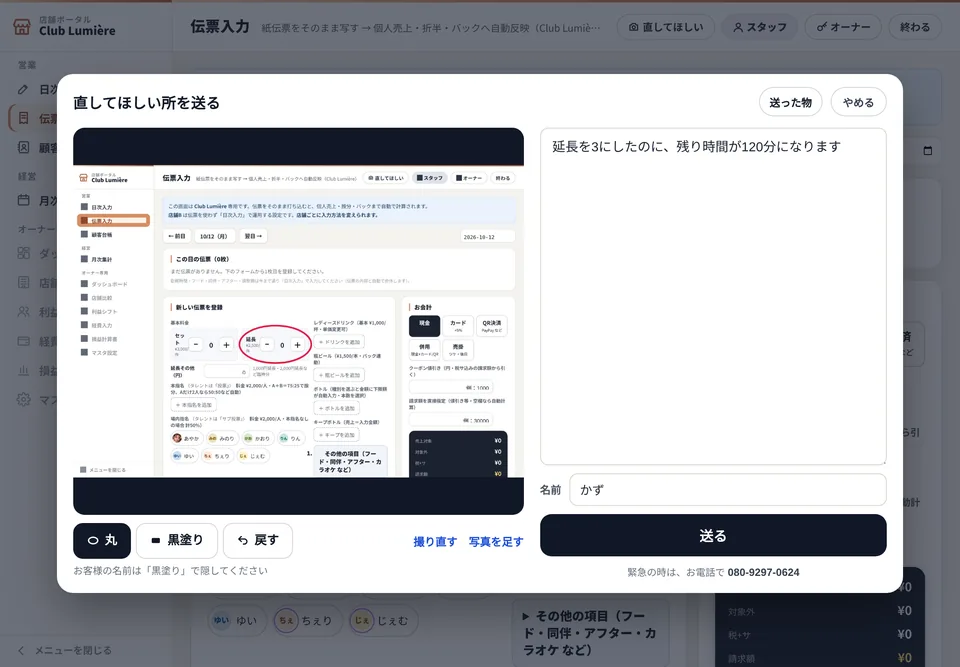
Improvements to fit your store (pricing rules, screen layout, slip and printout formats and so on) and new features are all included in the monthly fee. Only when devices are needed are the devices charged separately.
Ask us whether it can work the way your store does.
FAQ
QOur price list is quite unusual. Can it really go in as it is?
Yes. First, show us your current price list and slips. We build on the assumption that sets, extensions, nominations, dohan, tax and service charge order, rounding and card fees differ at every store. Even a calculation we do not have yet is built to your store's rules, within the monthly fee.
QCan you build features or paperwork that are not included yet?
Yes. Show us the paper forms and documents your store uses now (invoices, daily reports, statements and so on), and we build them in the same format. Features we do not have yet are built too, if your store needs them. Improvements to fit your store and new features cost nothing extra.
QOur rules aren't written down anywhere. They are only in the manager's head.
That's fine. At the consultation, we go through how you usually do checkout and pay calculation, step by step, and write it down for you. If you have a stack of slips or some notes, show us those too. Rules that were missed also come to light while you try it alongside your current way in the first month.
QDo we do the setup ourselves at the store?
No, we build it. All you have to do is show us your current rules, use it alongside your current way in the first month, and tell us where something differs.
QWhat happens when we raise prices or change a back rate?
Just ask from the top right of the screen you are using, with a photo and a few words. Changes to fit your store cost nothing extra. The progress shows on your store's screen, and the change reaches you automatically. For urgent problems, just call us.
QCan we start using it right away, like a ready-made register?
With Store Portal, we first ask about your store's rules and build it, and then you start. In return, there is no recalculating by hand once you are using it. The first month is a trial period, so we finish it while you try it alongside your current way of working. How long it takes depends on how many rules your store has.
Can your price list and pay rules go in exactly as they are?
Just ask us.
Try it for a month; if it doesn't fit, you pay nothing. Anyone can try the demo right now (staff 1111 / owner 9999).