Just enter the slips you wrote during business, one per group. The bill is calculated automatically from your store's price list, and daily and monthly sales, each cast member's back (commission), payslips and the P&L all follow from it. You can keep the register you have now.
One slip per group: sets, extensions, nominations, dohan, drinks, bottles
The bill follows your store's tax, service charge and rounding rules
Cash, card, QR payments, split payments and coupon discounts
Sales and back build up every day from the slips you enter
Keep your current register. Use your own phone or iPad
Included in every plan (the features are the same at every size; only the price depends on store size) See prices
Good for
Stores that re-enter their slips after closing
Stores that work out charges the register can't handle by hand
Stores that want sales and pay automated without changing their register
Stores that don't know their sales and profit until month end
Demo screens are shown in Japanese. Stores can switch their screens to English on each device.
Common problems with slips and sales totals
Off-the-shelf registers don't know the pricing rules of night-life venues. That part is left as handwork after closing.
Re-entering the night's slips after closing
Handwritten slips are typed into the register or a spreadsheet again. At the end of the day, the same numbers are written twice.
Charges the register can't handle, done by hand
Sets, extensions, in-house nominations, the order of tax and service charge, rounding up to the nearest ¥100. Whatever the register can't do ends up on a calculator.
Split payments and QR payments are a pain to total
Cash plus card, QR payments, coupon discounts. The more kinds of payment, the less the numbers add up at closing.
Nobody knows the sales until month end
How much the store sold this month, who got how many nominations. Until someone totals it, nobody knows for sure.
One slip per group, with only the usual items
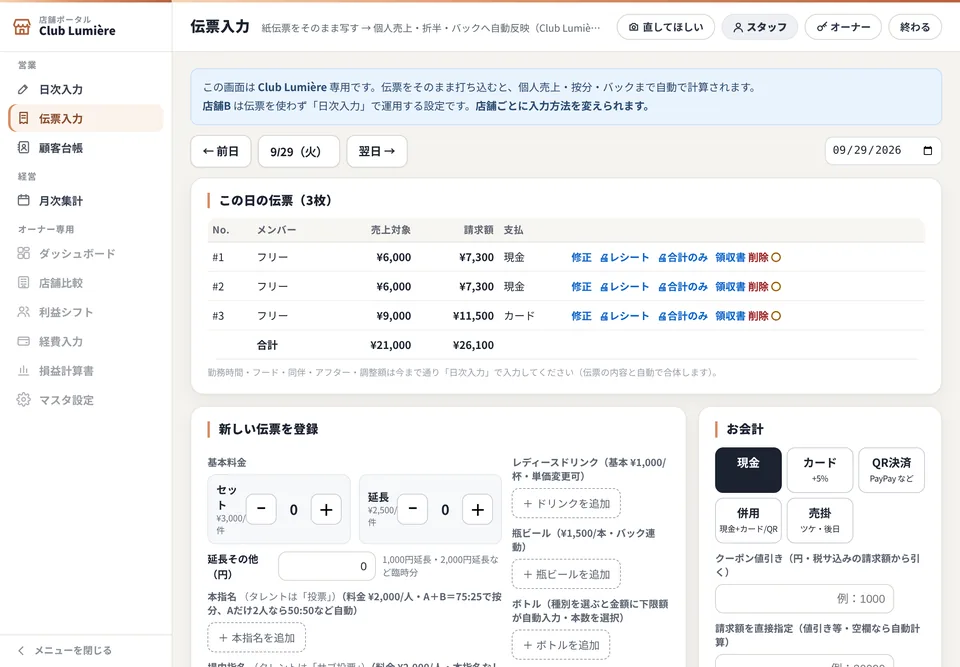
One slip per group of guests. You enter sets, extensions, nominations (honshimei and in-house), dohan (arriving at the club together with a guest), drinks, bottles, food, other items, and the number of guests. The item names and prices are taken from your own price list, exactly as it is (fully custom-built).
The bill is automatic. The order in which tax and service charge are applied, and rounding rules such as to the nearest ¥100, follow your store's rules. Payment can be cash, card (with the card fee included in the calculation), QR payment or a split, and you can add a coupon discount. You can also choose tab (credit).
The cast member who got the nomination or the drink is picked from round icons. That is easier than a list of names only, so entry is quick even at busy times.
Slip entry (demo screen)
What follows automatically from one slip
After you enter a slip, there is nothing to copy into another sheet. The same numbers flow into the next screen as they are.
Daily and monthly sales
Guests and sales per guest
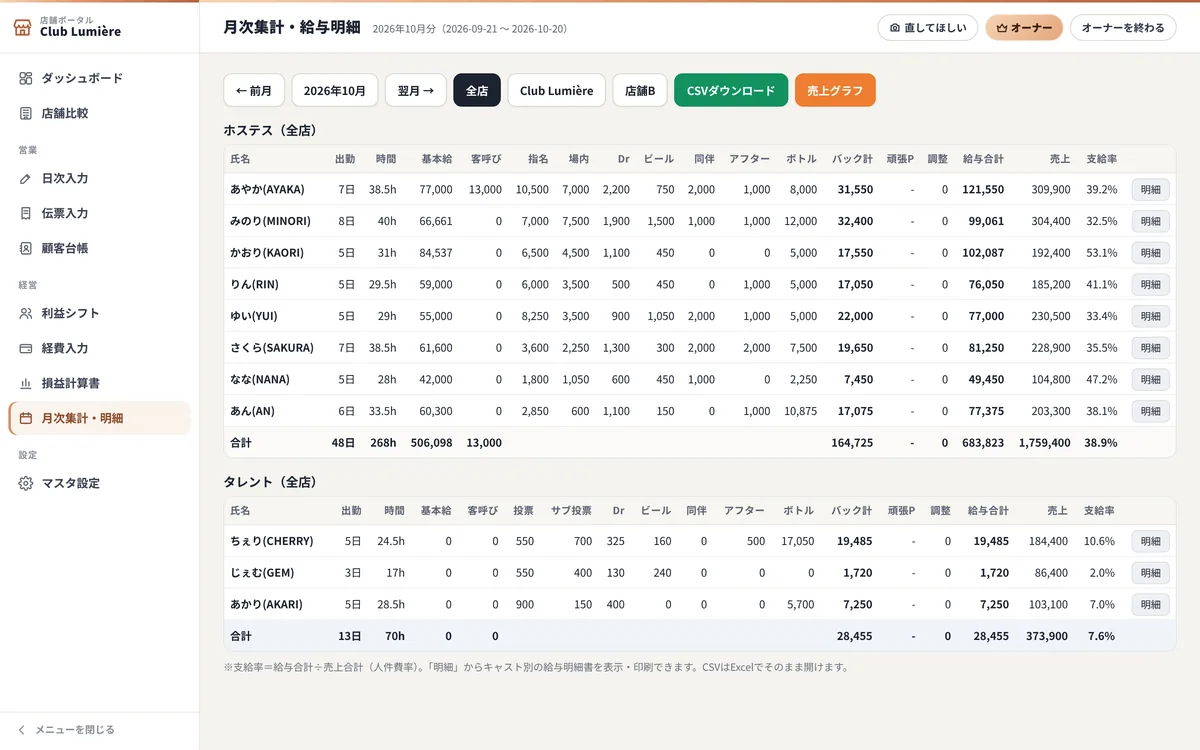
Each cast member's sales and back
Payslips (on the closing day)
P&L (profit and loss statement)
Owner dashboard (sales, operating profit and labor cost rate so far this month)
"Shift Planner" (today's required sales)
Cast My Page
Register close and the daily sales report
After closing, "Daily Entry" fixes the day
After closing, there is only one screen to fill in: "Daily Entry". Guests and groups, each cast member's working hours, various counts, and a memo. For working hours you just pick the times from a drop-down, like "19:00 to 1:00", and the hours are counted automatically even past midnight.
The day's slips and the "Daily Entry" together fix the day's sales, guest count and each cast member's back. The next day, the owner dashboard and the cast My Page show the figures up to the day before.
"Monthly" (built automatically from the slips and "Daily Entry")
Keep your current register, or bring the register in too
If you keep your current register, you take payments on the register you have now and enter the slips into Store Portal. You can enter them during business or all together after closing. Entry is from the browser on your own phone, iPad or PC, with no app needed.
If you bring the register in too, you open the table's slip from the table map on the Floor view, enter the orders and take the payment on the same screen. A slip that has been paid becomes the sales, register close and pay figures as it is, so there is no re-entering after closing.
The price is the same whichever you choose. You can start with your current register and bring the register in later. You can try the slip entry screen as it is in the demo (staff PIN 1111).
Calculation rules are set for each store
Rules like the ones below are different at every store. At the first consultation we ask to see your current price list and set everything up exactly as it is. The percentages and amounts are your store's own values.
Order of tax and service charge
Consumption tax on the subtotal and then service charge, service charge first, or service charge only. The order your store uses.
Rounding rules
Rounding the bill up to the nearest ¥100, or any other rounding rule, works the way your store does it.
Card fees
If your store adds a fee for card payments, we set it at your rate. For a split payment, the fee applies only to the card part.
Coupon discounts
Enter the discount amount and it is taken off the bill. When you print a receipt, it is printed as a discount line.
Slip entry and sales totals come with every plan
Slip entry and sales totals are included in every plan. The features are the same in every plan, and the price depends only on your store's size (size is not decided by store type alone; we settle it at the consultation). See Pricing for details.
Store Portal
Every feature. Priced only by store size
Small
Monthlyfrom ¥9,800(tax incl.)
Setup fee¥0
Small-to-medium
Monthly¥22,000(tax incl.)
Setup fee¥0
Medium-to-large
Monthly¥33,000(tax incl.)
Setup fee¥0
Larger stores
Large¥44,000
Extra-large¥55,000
a month, tax incl.
No app to install. It runs in the browser on your phone or computer
On every plan, the setup fee is ¥0. Try it for a month; if it doesn't fit, you pay nothing. The first month is the time to try it and for us to build your settings. If you continue, the monthly fee starts from month 1.
All prices include tax.
The first month is the time to try it and for us to build your settings. If it doesn't fit, you pay nothing; if you continue, the monthly fee starts from month 1.
The setup fee is ¥0 on every plan.
For small stores, only at the start of the contract, the monthly fees for months 1 to 3 are paid together in advance (monthly after that).
Ask us whether it can work the way your store does.
QCan we keep using handwritten slips during business?
A
Yes. You can keep paper slips during business as before, and enter them into Store Portal after closing, one slip per group. You enter only the usual items: sets, extensions, nominations, drinks, bottles and so on. You can also enter them on the spot from the table map during business and take the payment there too.
QThe items on the slip are different from our price list.
A
The slip's items, prices, order of tax and service charge, and rounding are built from your price list, exactly as it is (fully custom-built). Rules such as a different set price for one guest than for two or more, or extensions in 30-minute units, can go in too. Anything you want changed after you start, you just ask for from "Report an issue" at the top right of the screen, with a photo and a few words, at no extra charge.
QHow do we enter split payments and QR payments?
A
Choose "Split" under payment and enter the cash and card (or QR payment) parts. At stores that add a card fee, the fee is applied only to the card part. QR payments go in at the same bill amount as cash.
QCan we correct a slip that was entered wrongly?
A
Yes. Open the slip and correct it, and the sales and the cast member's back are recalculated with the corrected figures. Nothing is copied into another sheet, so no correction gets left out.
QHow much of the slip figures can the manager and the cast see?
A
With the staff PIN, you can see the slips, "Daily Entry", and back and sales on the "Monthly" screen. Pay, P&L and business figures open only with the owner's PIN. Cast members see only their own sales and their nomination, drink and bottle counts on their My Page.