How do you count the sales of the host in charge (honshimei, the host a guest has nominated as their own)? How do you split a table where help hosts also sat? How do you give back (commission) on bottles? Every club has its own rules, and we build yours in as they are. Keep your current register and just enter the slips, or run everything from the table map to checkout and register close on one system. Both use the same Store Portal at the same price. Affiliated stores can be compared side by side on the "Whole group" screen.
How sales count for the host in charge, and how tables are split, follow your club's rules
From back on bottles, nominations and dohan (arriving together with a guest) to a payslip for each host, automatically
Pay and the club's profit are visible only with the owner PIN
Compare sales, labor cost and profit across affiliated stores on one screen
Works with the register you have now
Good for
Clubs with a host-in-charge system, counting sales per host
Demo screens are shown in Japanese. Stores can switch their screens to English on each device.
Common sales and pay headaches at host clubs
At host clubs, how sales are counted and how back is paid differ from club to club. With a ready-made register, those differences are left as spreadsheet work after closing.
The register can't count the way you do
Host in charge, help, first-time visits. Counted with tax and service charge, or without. Your club's rules don't fit the register, so you total everything again before closing day.
Bottle back isn't a flat rate
Champagne and shochu earn back differently. The rate changes with the price band of the bottle, and you apply it by hand while looking at the slips.
Pay for each host is heavy work
You gather each host's sales, back and daily pay advances, then spend hours on the calculator before closing day.
Numbers you don't want in-house staff to see
On a shared device, hosts' pay and the club's profit end up in front of the in-house staff (naikin, the staff who are not hosts).
Host club pricing and pay rules we can build in
We ask about your price list, how your slips are written and your pay rules at the consultation, and build everything to match your club's rules (fully custom-built). For example, down to details like these:
Set fees (including different prices for one guest and for two or more)
Extension time and price
Nomination fees for the host in charge (honshimei) and for jounai (in-house nominations), and how sales are split
Bottles (back by price band), drinks and food
The order in which tax and service charge are applied
Rounding (such as rounding up to the nearest ¥100)
Card payments (fee included), QR payments and split payments
Daily or hourly wages, and deducting daily pay advances
Withholding tax rate and rounding
Closing day (end of the month, the 20th, etc.) and pay day
Choose the host in charge on the slip, and sales and back follow him
Just choose the host in charge (honshimei) on the slip, and sales and back are totaled per host automatically. The share for a table where help hosts also sat, and equal splits for jounai, are set by your club's rules. Bottle back can have a different rate for each price band.
Daily (or hourly) wages plus back and adjustments: on closing day, a payslip comes out for each host. Daily pay advances you have handed out can be taken off as an adjustment. Withholding tax is calculated at the rate you set, and you can choose how rounding is handled (please check the handling with your tax accountant). Payslips can also be exported as CSV.
Rules of your own, such as first-time visit pricing, back rates that change with sales, or back for help hosts, are built to fit your club too. Tell us your current rules at the first consultation. For how the calculation works, see Pay and back calculation.
Hosts see this month's sales and ranking on their own phones
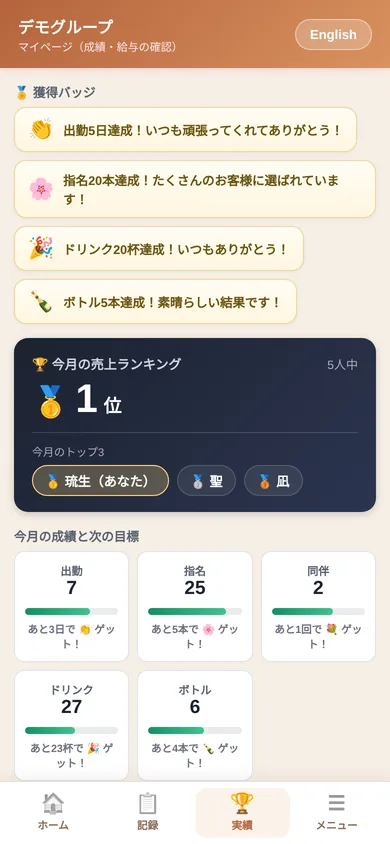
Every host has his own My Page on his own phone. How much he has sold this month, how many days he has worked, how many nominations, drinks and bottles, all with a day-by-day record. He also sees the sales ranking (the top three and his own place), the badges he has earned and the next goal, and "thank you" cards from the club.
He enters with his own 4-digit PIN. The page is built so that he cannot see other hosts' sales or pay, or the club's profit. For the other screens, see Cast My Page.
Host's My Page
To run checkout through register close on one system
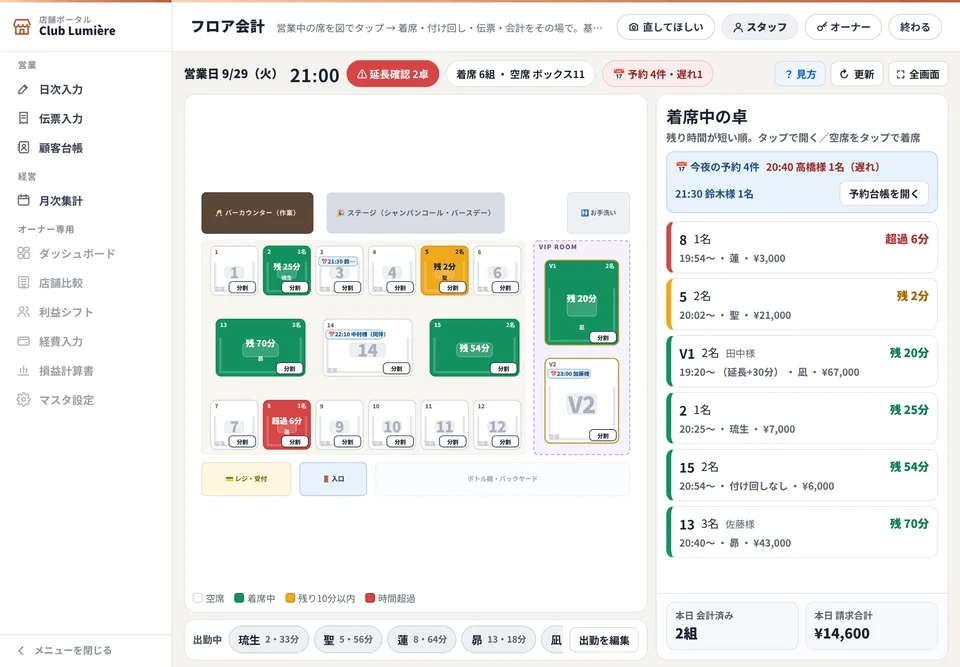
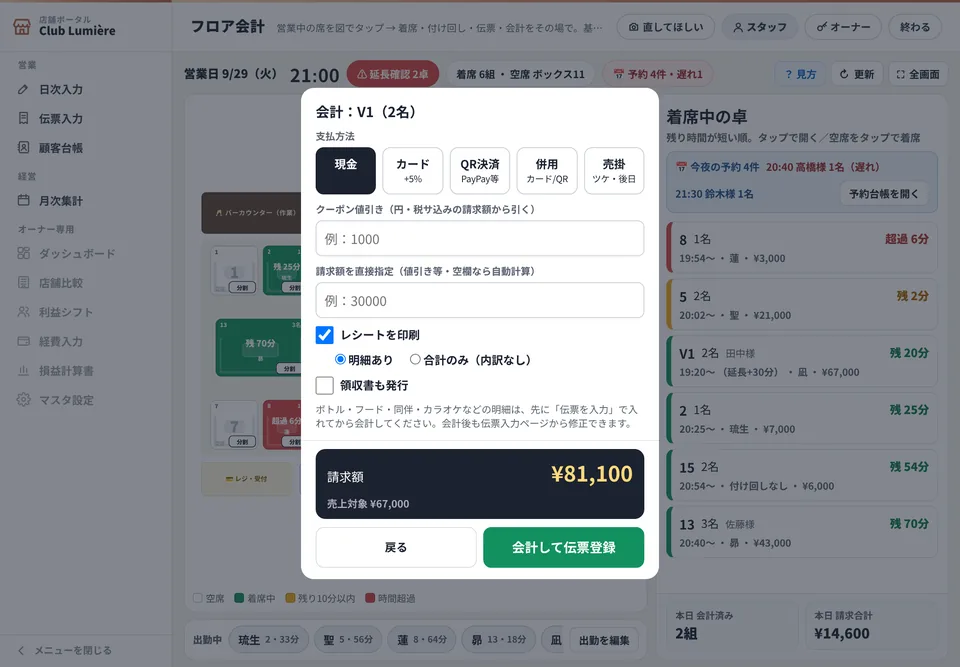
We build a table map from your floor plan, laid out just like your tables and sofas. Seating, rotating hosts between tables, shared tables and table moves are done on the spot. Time left is shown by color (yellow = ending soon, red = over time), and entering an extension on the slip moves the end time. Checkout is done from the table, in cash, by card, by QR payment or a mix. Receipts and formal receipts (with addressee, purpose line and invoice registration number) print on the spot.
At register close after closing, today's sales are already lined up from the slips, so you only enter the number of bills and coins. The daily sales report prints on A4 or saves as a PDF. Checkouts put on a tab (credit) stay on the list of unpaid tabs and go into the register close on the day they are collected. Whether to offer tabs, and the rules when you do, is for your club to decide in line with the law and local ordinances. If in doubt, please consult a lawyer or another professional.
Numbers kept from in-house staff, and the group overview
The entry screen has a single PIN field. The number you enter tells the system whether you are staff or the owner. The in-house staff PIN opens "Slips", "Daily Entry", the customer book, the table map and register close. In "Monthly", staff see each host's back and sales, but no further. Hosts' pay and the P&L open only with the owner PIN. A screen left open closes by itself after a while without being touched, and owner screens close the moment you leave the screen. After five wrong PINs, entry is blocked for 15 minutes.
Groups with affiliated stores get an owner "Whole group" screen, where each store's sales, labor cost and profit sit side by side. You can move between the stores' screens without entering the PIN again. Pricing for running several stores together depends on the number of stores and how you use it, so please ask us.
If you don't want to change your register, you don't have to: just enter the slips after business hours, and each host's sales, back and pay, through to the P&L, are put together. If you want checkout and register close on the same system, do them in Store Portal too. The price does not change. In the demo, you can switch the table map to the host club layout (staff 1111 / owner 9999; in the demo, the Floor view goes by the name "Floor checkout").
Pricing for host clubs
Pricing depends only on store size (from small to extra-large), and the features are the same in every plan. Size is not decided by store type alone; we settle it at the consultation. Depending on how your club is laid out, for example with more than one floor, we quote individually.
Store Portal
Every feature. Priced only by store size
Small
Monthlyfrom ¥9,800(tax incl.)
Setup fee¥0
Small-to-medium
Monthly¥22,000(tax incl.)
Setup fee¥0
Medium-to-large
Monthly¥33,000(tax incl.)
Setup fee¥0
Larger stores
Large¥44,000
Extra-large¥55,000
a month, tax incl.
No app to install. It runs in the browser on your phone or computer
On every plan, the setup fee is ¥0. Try it for a month; if it doesn't fit, you pay nothing. The first month is the time to try it and for us to build your settings. If you continue, the monthly fee starts from month 1.
All prices include tax.
The first month is the time to try it and for us to build your settings. If it doesn't fit, you pay nothing; if you continue, the monthly fee starts from month 1.
The setup fee is ¥0 on every plan.
For small stores, only at the start of the contract, the monthly fees for months 1 to 3 are paid together in advance (monthly after that).
Ask us whether it can work the way your store does.
QHow are sales split for a table with both the host in charge and help hosts?
A
Choose the host in charge (honshimei) on the slip, and the sales are totaled under him. How help hosts are treated, and the share when two hosts split a table, are set exactly as your club's rules say. Rules of your own, such as how first-time visits are handled, are built to fit your club too.
QCan we set a rule where more expensive bottles earn more back?
A
Yes. Bottle back can be set at a different rate for each price band. You can also give champagne its own rate. Back rates that change with the amount of sales are built to fit your club too.
QCan the pay closing day be the end of the month or the 20th?
A
Yes. You can choose the end of the month or a fixed date such as the 20th. If you set a pay day, it is shown on the payslip too. Daily pay advances you have handed out can be taken off as an adjustment.
QCan we keep our current POS register and use only the payroll?
A
Yes. Checkout stays on your current register, and you just enter the slips after business hours. Each host's sales, back and pay, through to the P&L, are put together. The setup fee is ¥0, and it runs on the phones, iPads and PCs you already have.
QCan we see two or more affiliated stores together?
A
Yes. On the owner "Whole group" screen, each store's sales, labor cost and profit sit side by side. Pricing for several stores is quoted individually.