Store Portal店舗ポータル 日本語

Girls' bars & boys' bars

Time-based charges and drink back,just as your bar does them:a POS system for girls' bars.

The travel fee is free for the first visit only.

Time-based charges, extensions and cast drink prices, plus your hourly wage and drink back (commission per drink sold) rules, are built to match your bar's price list and pay rules. Boys' bars work the same way. Keep your current register and just enter the slips after business hours, or run from a seat-by-seat counter map through to checkout. Both use the same Store Portal at the same price.

  • Time-based charges and extensions, exactly as on your price list
  • Drink back is worked out automatically from the drinks on the slips
  • Enter shifts and hours, and hourly pay is automatic too
  • Cast check their drink counts and shifts on their own phones, in English too

Good for

  • Bars that run on time-based charges
  • Bars where drink back is the main part of pay
  • Bars with foreign cast members
  • Counter bars with a quick turnover of guests
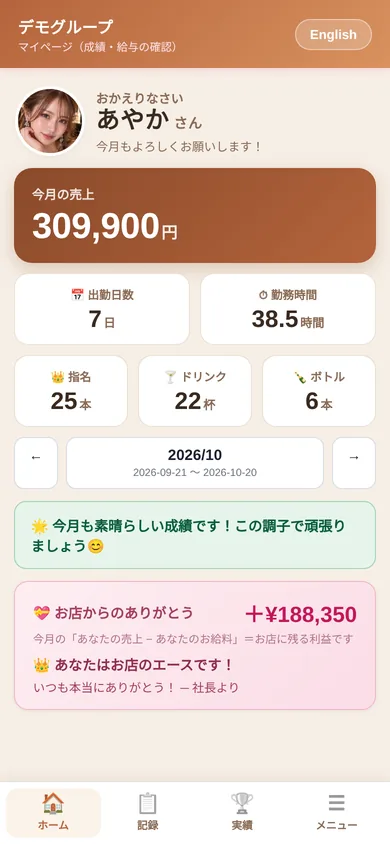
Cast My Page: this month's sales and the number of days worked, hours, nominations, drinks and bottles (demo screen)

Demo screens are shown in Japanese. Stores can switch their screens to English on each device.

Common headaches at girls' bars and boys' bars

The quicker the turnover and the more the price changes with time, the harder it is to keep up with paper and memos.

  • Arrival times kept on memos

    Once every counter seat is taken, you can't remember how many minutes each guest has left. The extension call comes late, and the guest just leaves.

  • Drink back counted in tally marks

    Who got how many drinks is counted from tally marks on the slips, all at once on closing day. A miscount means an argument with a cast member.

  • Working out hourly pay every night

    Cast members start at different times. You add up their hours and work out hourly pay and daily pay advances by hand.

  • Explaining to foreign cast members every time

    When the screen is Japanese only, someone has to sit next to them and explain every time they check their shifts or drink counts.

Time-based pricing and back rules we can match at girls' bars

We ask about your set, extension and drink prices and your hourly wage and back rules, and build everything exactly that way (fully custom-built). Unlike a ready-made POS system, you don't have to change your prices to fit the register. For example:

  • Time-based charges and sets (how many minutes, at what price)
  • Extension time and price
  • Nomination fees (only if you have them)
  • Cast drinks and shots
  • Bottles and food
  • How tax and service charge are applied, and how rounding works
  • Coupon discounts, QR payments and card fees
  • Hourly wages, daily wages and daily pay advances
  • Back rates for drinks and nominations
  • Closing day and pay day (end of the month, etc.)

Drink back and hourly pay, automatically from slips and shifts

When you enter a drink on the slip, choose the cast member, and drink back is calculated automatically from the number of drinks. No more counting tally marks. Enter shifts and hours (just pick the times), and hourly pay is automatic too. Closing day and pay day follow your bar's rules, and on closing day you can print payslips. Daily pay advances you have handed out can be taken off as an adjustment.

Enter which cast members are working today, and "today's required sales" is worked out from labor cost and fixed costs ("Shift Planner"), a guide for deciding how many people to call in before opening. Rules of your own, such as an hourly wage that changes by time of day, are built to fit your store too. Tell us about them at the first consultation. For how the calculation flows, see Pay and back calculation.

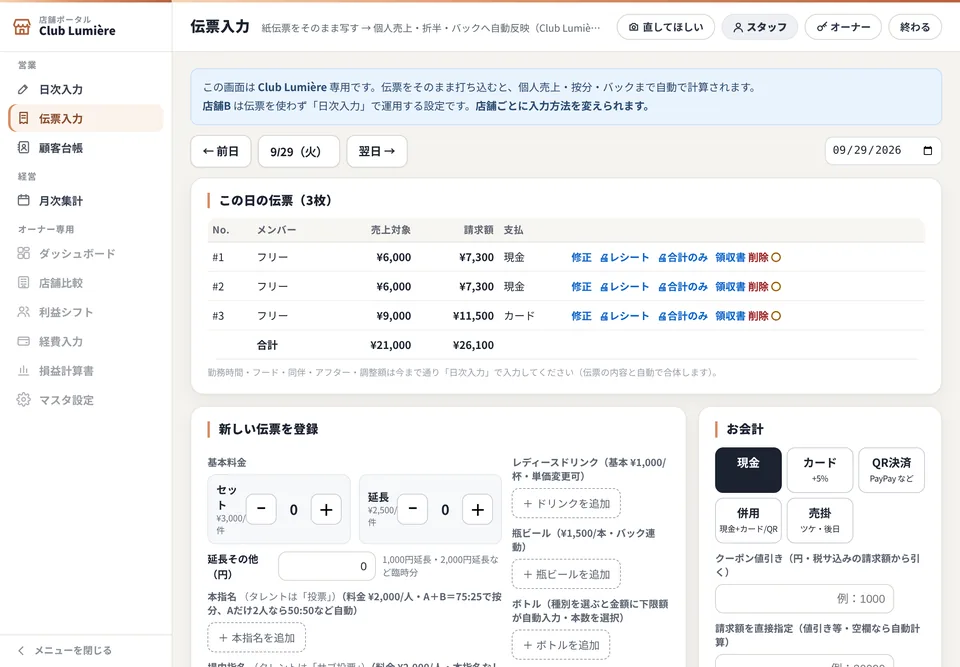
"Slips" screen: number of sets and extensions, cast drink and bottle items, and the payment method at checkout (demo screen)
Slip entry

Rankings and badges make cast members' efforts visible

Days worked, drink counts, this month's sales and a day-by-day record: cast members can check them on their own phones any time. They also get badges, how far they are from the next goal, the sales ranking (the top three and their own place) and "thank you" cards from the bar. No more asking the manager "How many drinks this month?"

Each cast member enters with her own 4-digit PIN. Other cast members' pay and the bar's profit do not appear on My Page. It can be switched between Japanese and English, so foreign cast members can read it by themselves. See Cast My Page for details.

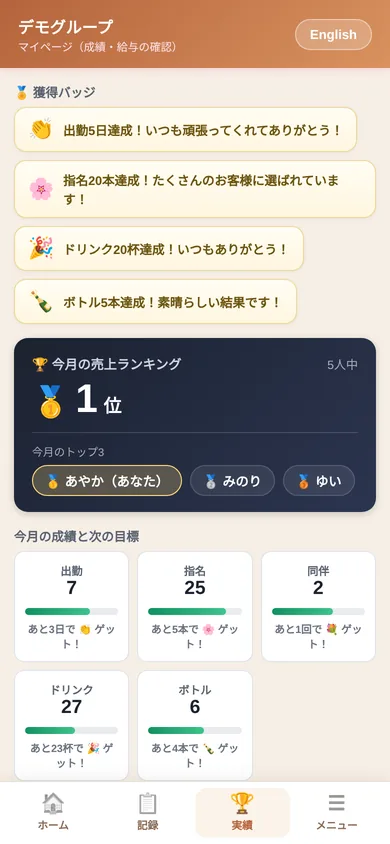
My Page results tab: badges achieved, ranking place, and shift and drink results (demo screen)
Cast My Page (results)

Ask us whether it can work the way your store does.

A seat-by-seat counter map for extension calls and checkout

We build the table map for each bar from its floor plan. Seat by seat along the counter, or mixed with table seats, both are fine. When a guest sits down, tap the seat and enter the number of guests, the set time and the cast member with them. The seat turns yellow when time is running low and red when it has run over, so the extension call is harder to miss. Enter an extension on the slip, and the end time moves automatically.

Checkout is done by choosing the seat. A receipt prints, and everything flows from the slips through to register close and the daily sales report after closing. In the demo, you can switch to a counter-style table map for girls' bars (the demo is in Japanese; its menu calls it "フロア会計"). For how it works, see Floor view.

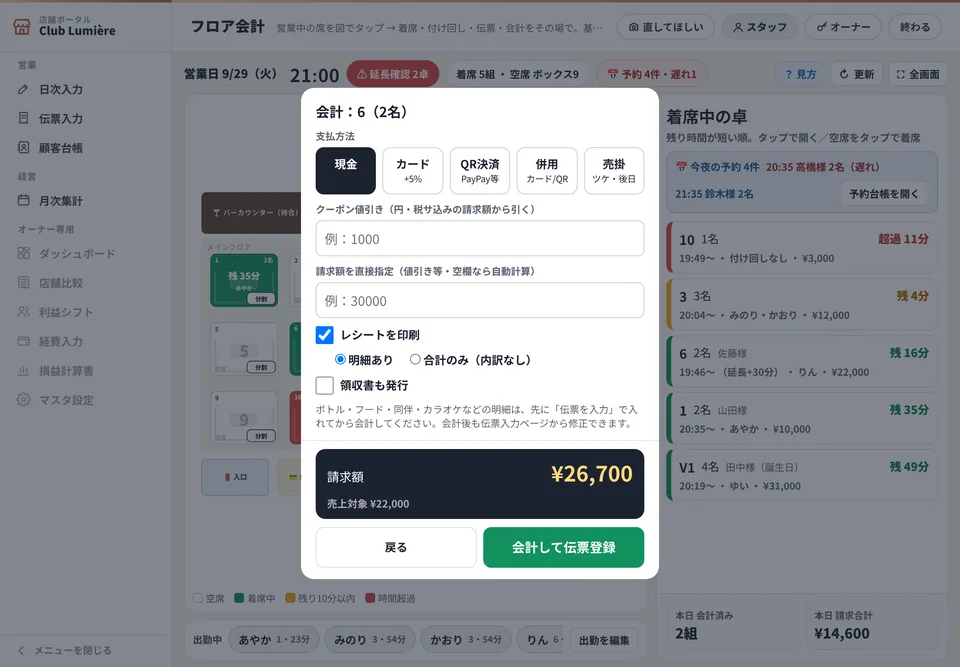
Checkout window on the Floor view: choice of cash, card, QR payment, split payment or tab, and the amount due (demo screen)
Checkout from the Floor view

Switch the screens to English for foreign cast members

Stores that turn it on can switch the screens to English, device by device. You can split it so that the devices cast members use are in English while the register device stays in Japanese. My Page can be read in English too. Printouts such as receipts and the daily sales report stay in Japanese.

If you don't need a table map or receipts, keep your current register. Just enter the slips after business hours, and sales, hourly pay, drink back and P&L are put together automatically. The setup fee is ¥0, and you can start on the phones, iPads and PCs you already have. If you come to want a table map or receipts, you can start using them later (the price stays the same).

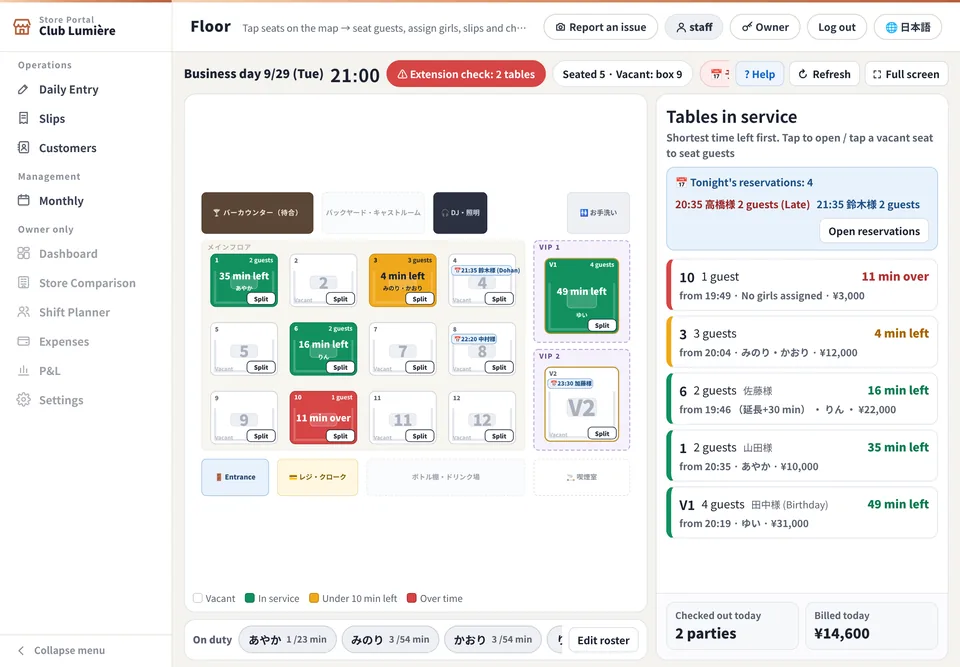
Floor view in English: table map with the time left for each table shown in English (demo screen)
English screens (switched per device, only on the devices you choose)

Pricing for girls' bars and boys' bars

Pricing depends only on store size (from small to extra-large), and the features are the same in every plan. Size is not decided by store type alone; we settle it at the consultation, going by your seats and how you run the bar. Whether you keep your current register or bring checkout and register close into the same system, the price stays the same.

Store Portal

Every feature. Priced only by store size

Small

Monthlyfrom ¥9,800(tax incl.)

Setup fee¥0

Small-to-medium

Monthly¥22,000(tax incl.)

Setup fee¥0

Medium-to-large

Monthly¥33,000(tax incl.)

Setup fee¥0

Larger stores

  • Large¥44,000
  • Extra-large¥55,000

a month, tax incl.

No app to install. It runs in the browser on your phone or computer

On every plan, the setup fee is ¥0. Try it for a month; if it doesn't fit, you pay nothing. The first month is the time to try it and for us to build your settings. If you continue, the monthly fee starts from month 1.

  • All prices include tax.
  • The first month is the time to try it and for us to build your settings. If it doesn't fit, you pay nothing; if you continue, the monthly fee starts from month 1.
  • The setup fee is ¥0 on every plan.
  • For small stores, only at the start of the contract, the monthly fees for months 1 to 3 are paid together in advance (monthly after that).

Ask us whether it can work the way your store does.

FAQ

QCan boys' bars use it too?
A

Yes. Boys' bars use it the same way. Your price list for sets, extensions and drinks, and your hourly wage and back rules, are built your way, and Cast My Page is available too.

QWhere can we check a cast member's drink back?
A

Enter a drink on the slip and choose the cast member, and the drink count and back are totaled automatically. With the staff PIN, "Monthly" shows back and sales, and cast members can check their drink counts on their own My Page.

QCan a small bar that doesn't need a table map use it?
A

Yes. Keep your current register and just enter the slips after business hours, and sales, hourly pay, drink back and P&L are put together automatically (from ¥9,800 a month at the small size, ¥0 setup fee, tax included). If you come to want a table map or receipts, you can start using them later (the monthly fee stays the same; at the small size, if you print receipts, the receipt printer is bought or rented separately).

QCan foreign cast members use it?
A

Yes. Stores that turn it on can switch the screens to English, device by device. Cast My Page can also be set to Japanese or English. Printouts such as receipts and the daily sales report stay in Japanese.

QCan cast members see other cast members' hourly wages or back?
A

No. My Page shows only their own numbers, and the sales ranking shows only the top three and their own place. Other cast members' pay and the bar's profit open only with the owner PIN.

Can your price list and pay rules go in exactly as they are?
Just ask us.

Try it for a month; if it doesn't fit, you pay nothing. Anyone can try the demo right now (staff 1111 / owner 9999).