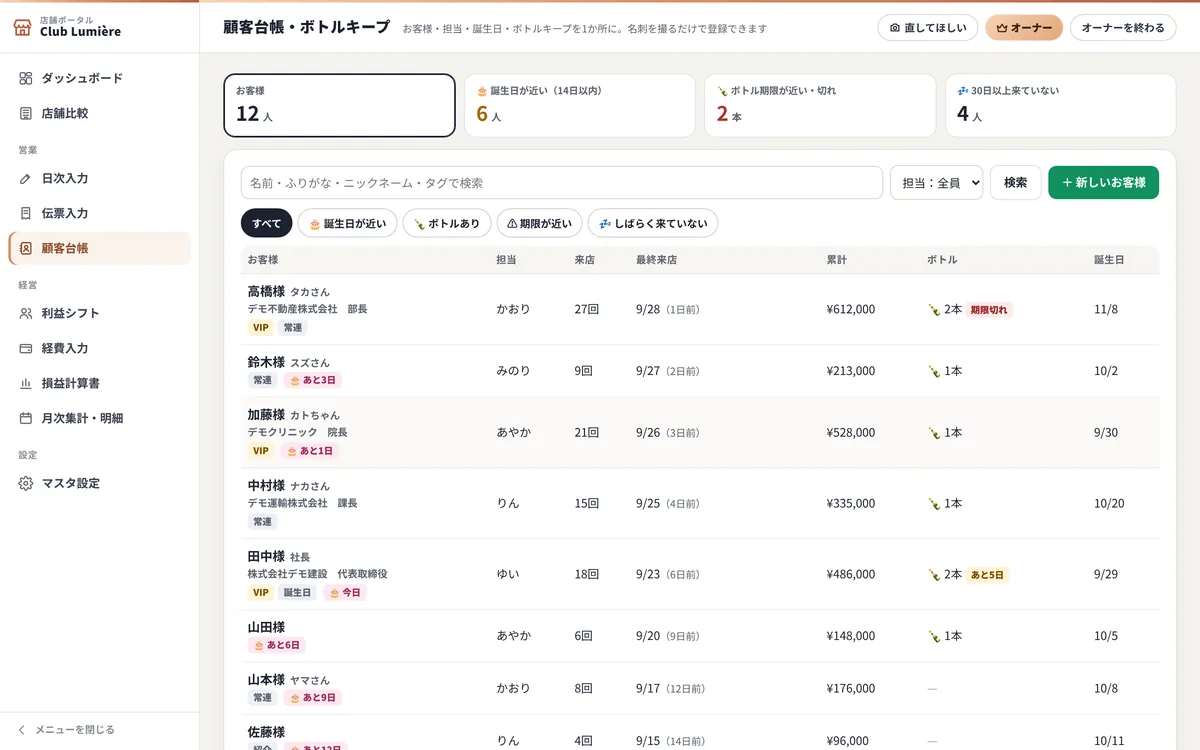
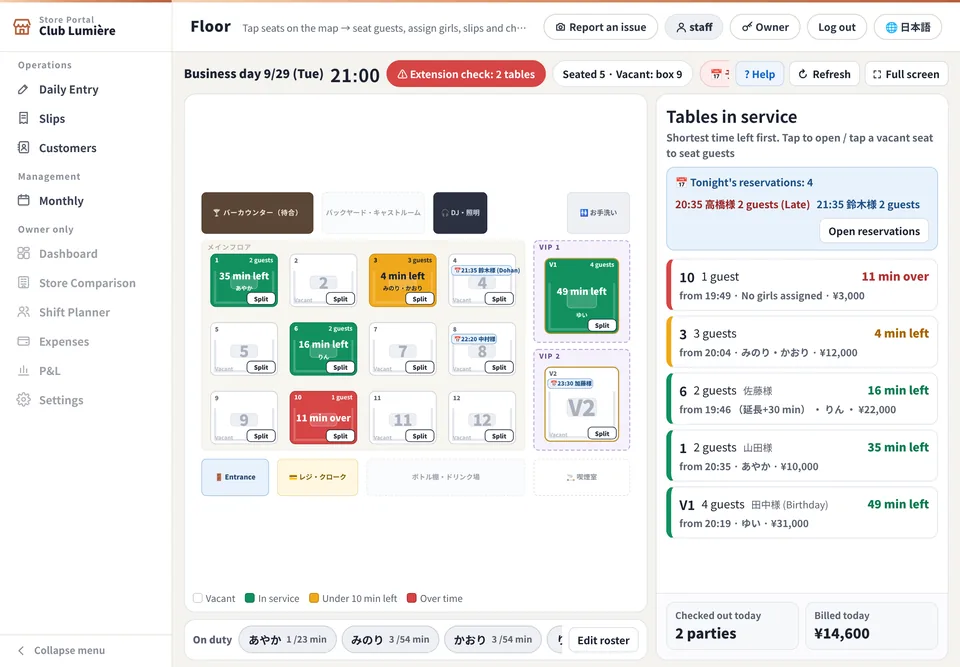
Your customers' names, companies, cast in charge, birthdays and notes, together with the bottles they keep, all in one place. For a new customer, just photograph the business card and the name and company are filled in. It works with your current register too.
Photograph a business card and the AI reads it in
Record each bottle's brand, expiry date and amount left
Filter by birthday and bottle expiry
Visits recorded automatically at checkout on the table map
Included in every plan (the features are the same at every size; only the price depends on store size) See prices
Good for
Stores with many kept bottles
Stores that receive many business cards
Stores with a cast-in-charge system and many regulars
Demo screens are shown in Japanese. Stores can switch their screens to English on each device.
Common problems with customer records at night-life venues
Customer information is one of your store's most valuable assets. Yet it tends to end up scattered in different places.
Customer details exist only on a cast member's phone
Contacts and preferences are known only to the cast member in charge. When they leave, nothing stays with the store.
Nobody knows when the bottles expire
Unless you check the keep tags one by one, you don't know when a bottle was opened or until when it is kept.
Birthdays slip by
It is written down somewhere, but nobody notices it coming up. You remember on the night itself.
Business cards just pile up
No time to type them in, so the cards you were given sit in a drawer.
What you can keep for each customer
You can keep the following for each customer. You can search by name, reading, nickname or tag, and filter by the cast member in charge.
Display name (how you address them), full name and reading
Nickname
Company and position
Phone and email
Birthday
Cast member in charge
Tags (VIP, regular, etc.)
Notes (favorite drinks, topics, etc.)
Business card photo (one per customer)
Bottle keep (brand, shelf, date opened, expiry, amount left)
Photograph the business card to cut down the entry work
On the new customer screen, tap "Take or choose a card photo" and take the photo with your phone's or iPad's camera. The AI reads the name, reading, company, position, phone and email and puts them into the fields.
You can check and correct what was read before saving. If a customer with the same phone number, email address or name is already in the book, a message says "This person may already be in the book" with a link to them, so double entries are avoided too.
Filters show you who to reach out to
Counts of customers and bottles appear above the list, and one tap narrows the list down to just those people.
Birthday coming up
Customers whose birthday is near. For preparing a celebration or timing a message.
Bottle expiring soon, or expired
Bottles close to their expiry date, and expired ones. No need to check the shelf one by one.
Has a bottle
Only customers who keep a bottle. Useful when preparing for a visit.
Not visited for a while
Customers who have not visited for 30 days or more. Most useful when you take payments on the Floor view, where each checkout records the visit automatically.
With the Floor view, visits are recorded automatically
On the Floor view, if you pick the customer when seating them, each checkout automatically records the number of visits, the last visit, the total spent and the visit history. When a customer is seated from a reservation in the reservation book, the customer carries over as well.
The checkout amounts behind the total are worked out from your store's price list, down to sets, extensions, nominations, tax and service charge and rounding. Because the price list and the pay rules are all built around your store (fully custom-built), the totals in the book match your store's own checkout figures. What you can do on the table map is covered on the Floor view page.
Floor view
A day with the customer book and bottle keep
1
Before opening: today's preparation
Filter by "Birthday coming up" and "Expiring soon" to see who to contact or celebrate, and which bottles to prepare.
2
Arrival: pick the customer and seat them
When seating a group on the Floor view, pick the customer from the book.
3
A first-time customer: photograph the card
Photograph the business card you were given, right there, to register them. Pick the cast member in charge too.
4
When a bottle is opened: add it to keep
Enter the brand, shelf, date opened and expiry. As the bottle goes down, update the amount left.
5
Checkout: the visit is recorded
When you take payments on the Floor view, each checkout adds to the visit count and the total automatically. If you take payments on your current register and enter the slips, sales are totaled, but visits are not recorded in the book automatically.
Pricing: the customer book is included in every plan
The customer book, bottle keep and business card reading, as well as the Floor view with automatic visit records at each checkout and the reservation book, are included in every Store Portal plan. The features are the same in every plan, and the price depends only on your store's size. For full pricing, see Pricing.
Store Portal
Every feature. Priced only by store size
Small
Monthlyfrom ¥9,800(tax incl.)
Setup fee¥0
Small-to-medium
Monthly¥22,000(tax incl.)
Setup fee¥0
Medium-to-large
Monthly¥33,000(tax incl.)
Setup fee¥0
Larger stores
Large¥44,000
Extra-large¥55,000
a month, tax incl.
No app to install. It runs in the browser on your phone or computer
On every plan, the setup fee is ¥0. Try it for a month; if it doesn't fit, you pay nothing. The first month is the time to try it and for us to build your settings. If you continue, the monthly fee starts from month 1.
All prices include tax.
The first month is the time to try it and for us to build your settings. If it doesn't fit, you pay nothing; if you continue, the monthly fee starts from month 1.
The setup fee is ¥0 on every plan.
For small stores, only at the start of the contract, the monthly fees for months 1 to 3 are paid together in advance (monthly after that).
FAQ
QCan the card reading put in something wrong?
A
You can check and correct what was read on the screen before saving. When the reading of a name has been guessed, it says so. If the photo does not show a business card, it tells you "This does not look like a business card".
QWill it tell me when a bottle is about to expire?
A
Notifications are not included at present. The number of bottles expiring soon or expired appears above the list, and one tap shows them as a list, so we recommend checking it before opening. If your store needs notifications, we can build them to fit.
QCan I use it with my current register?
A
Yes. Customer details, business card reading, bottle keep and the birthday and expiry filters work with your current register. To record visit counts and totals automatically at each checkout, take the payment on the Floor view. The Floor view and the reservation book come at the same price.
QWhat happens to the customer records when a cast member leaves?
A
The book belongs to the store, so the customer records stay as they are. The cast member in charge can be changed to someone else.
QCan the business card photos be seen from outside?
A
Business card photos can be seen only by people signed in with the store's PIN. Even if someone knows the photo's address, it does not open without the PIN.