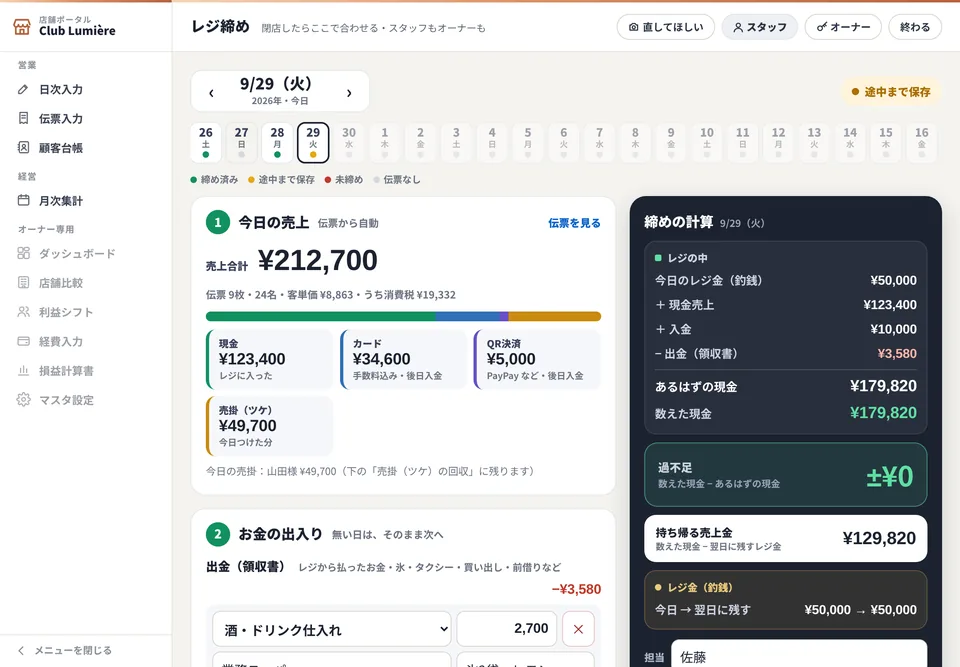
Today's sales, split into cash, card, QR payments and tabs, are already in from the slips. After closing, enter the number of notes and coins to check the over/short, close the register, and print the final settlement and the A4 daily sales report. It brings everything from checkout to register close into one system.
Today's sales come in from the slips automatically
Enter the denominations and the over/short appears
Interim report and final settlement, ready to print
An A4 daily sales report in the same layout as the handwritten one
Included in every plan
Included in every plan (the features are the same at every size; only the price depends on store size) See prices
Good for
Stores that can't trace why the register doesn't balance
Stores that write a paper daily sales report by hand
Stores that want to stop re-entering after closing
Demo screens are shown in Japanese. Stores can switch their screens to English on each device.
Common problems with register close after closing time
It happens every night, so small chores and small gaps add up.
No way to tell why it doesn't balance
Only the total is left, so you can't trace where it went wrong. Day after day gets written off as "a discrepancy".
Re-entering slows down the close
Handwritten slips from the night are typed into the register after closing. By the time it's done, everyone is worn out.
Writing the daily report by hand, every day
Total sales, cash, tabs, card, payouts, denominations. Filled in with a calculator, then searched again for writing mistakes.
Corrections after closing throw the numbers off
Correct a slip after the register is closed and the report and the register no longer match. Later, nobody knows what was changed.
Register close after closing time, in this order
1
Check the sales
Check the sales that came in automatically from the slips (cash, card, QR payments, tabs), and the number of slips and guests.
2
Enter payouts and pay-ins
Expenses and daily pay advances taken from the register go in as payouts with an expense category; change top-ups and the like go in as pay-ins, each with its details.
3
Enter tab collections
For customers who came to pay, tap "Collect" in the unpaid list and enter it.
4
Count the cash
Enter the number of notes and coins, and the counted cash and the over/short appear right away.
5
Close and print
Choose the person in charge and the weather, and tap "Close (final settlement)". Print the final settlement; the A4 daily sales report opens with one tap too.
The closing calculation shows every movement of cash
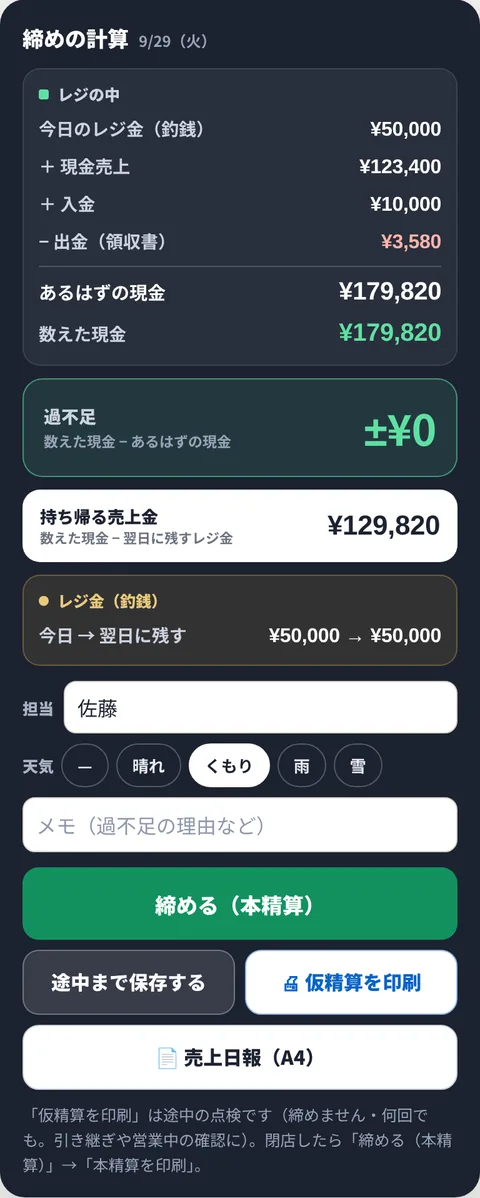
Take the float (change), add cash sales, money put into the register and tab collections in cash, and subtract money taken out (including mid-shift pickups). That is the "cash expected in the register". The difference from the cash counted is the over/short.
Some stores count everything in the register; others take out the float first and count only the sales cash. The counting method and the period for the running totals (the closing period) are set to the way you work now. Pricing, pay rules and the way you count at register close are all built around your store: fully custom-built.
Closing calculation and over/short
Example of the over/short calculation
All figures are examples. For a store that counts everything in the register:
Over/short = cash counted − cash expected. After taking out the float to leave for the next day (¥30,000 in this example), ¥134,000 is the sales cash to take home. The reason for an over/short can be kept in a memo.
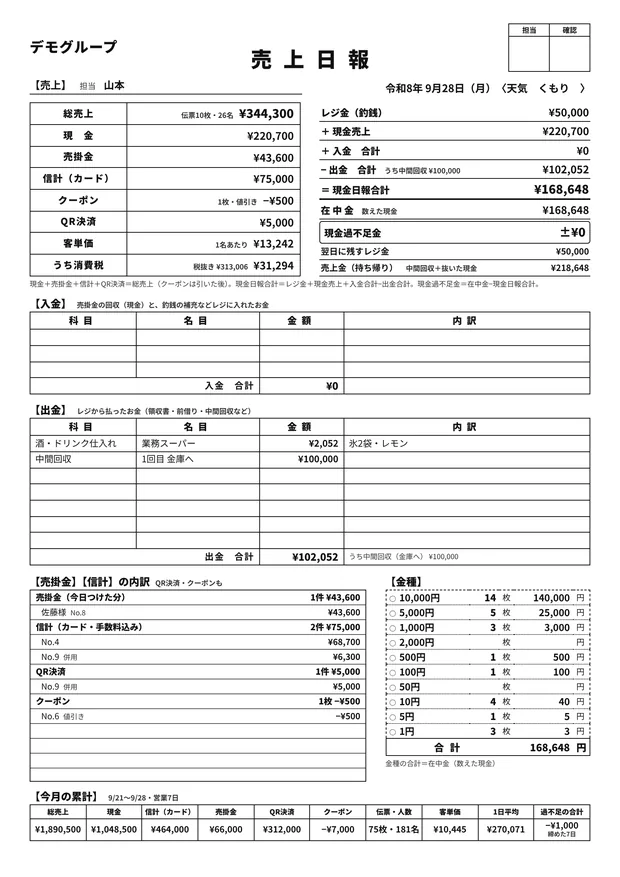
A night-life daily sales report on A4, in the same layout as the handwritten one
Total sales, cash, tabs, card, coupons and QR payments, through to the breakdown of pay-ins and payouts, the denominations and the month's running total. There are fields for the person in charge and the weather, and boxes for approval stamps.
It fits on one A4 sheet, so you print it or keep it as a PDF. Opened before closing, it is clearly marked "Not closed (figures in progress)".
Daily sales report (A4, sample)
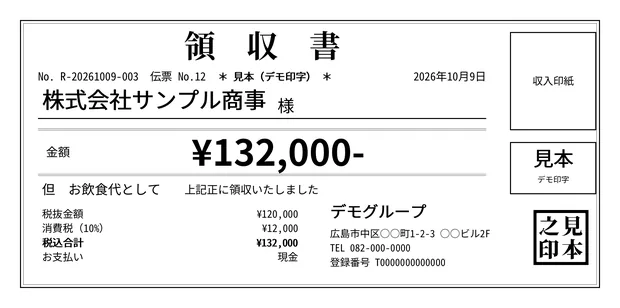
Receipts and formal receipts can be printed too
The checkout receipt comes in two forms: itemized or total only. The formal receipt is landscape and can be printed with the addressee (corporate suffix before or after the company name), the description, the amount before tax and the consumption tax, a revenue stamp box, the company seal image and the registration number.
Formal receipt (landscape, sample)
A closed day is fixed. Later corrections are visible
Once a day is closed with the final settlement, its figures are fixed. If a slip is corrected after that, the change is listed as a "correction after close" and appears on the daily sales report too. Only the owner can reopen a closed day and close it again.
Money paid out under an expense category goes straight into the P&L, so there is nothing to enter again in "Expenses" (daily pay advances are recorded only, not counted in the P&L). The owner's dashboard also shows the latest close's over/short. You can also produce a monthly summary of one month (a monthly sales report, A4 landscape) and a file (CSV) that Yayoi accounting software can import.
Pricing: register close is included in every plan
Register close, the daily sales report, receipt and formal receipt printing and tab (credit) management are included in every Store Portal plan. The features are the same in every plan, and the price depends only on your store's size. The setup fee is ¥0. See Pricing for details. You can try the register close screen in the demo too.
Store Portal
Every feature. Priced only by store size
Small
Monthlyfrom ¥9,800(tax incl.)
Setup fee¥0
Small-to-medium
Monthly¥22,000(tax incl.)
Setup fee¥0
Medium-to-large
Monthly¥33,000(tax incl.)
Setup fee¥0
Larger stores
Large¥44,000
Extra-large¥55,000
a month, tax incl.
No app to install. It runs in the browser on your phone or computer
On every plan, the setup fee is ¥0. Try it for a month; if it doesn't fit, you pay nothing. The first month is the time to try it and for us to build your settings. If you continue, the monthly fee starts from month 1.
All prices include tax.
The first month is the time to try it and for us to build your settings. If it doesn't fit, you pay nothing; if you continue, the monthly fee starts from month 1.
The setup fee is ¥0 on every plan.
For small stores, only at the start of the contract, the monthly fees for months 1 to 3 are paid together in advance (monthly after that).
FAQ
QWhat is the difference between the interim report and the final settlement?
A
The interim report is a check before closing. You can print it as many times as you like, for handovers or checks during business. The final settlement is for the day closed after business; it prints the day's totals and the running totals since the first day of the closing period on one sheet.
QCan it be used at a snack bar where one person does the close?
A
Yes. You just enter the counts on the closing screen. The Small plan is from ¥9,800 a month (tax included), and register close is included.
QCan we use register close without installing an app?
A
Yes. There is nothing to install: it opens in the browser on a phone or PC. Put an icon on the home screen and you open it from there next time (you enter the PIN each time you open it).
QWhat if we move cash to the safe during business?
A
Enter it under "Mid-shift pickup (to safe)" and it is subtracted from the cash expected. It does not go into the P&L, and appears as a separate line on the final settlement and the daily sales report.
QWhat happens on a day the register doesn't balance?
A
The over/short amount appears right away, so you can note the reason in a memo and close. The over/short goes on the final settlement and the daily sales report, and the total over/short for the closing period appears in the running totals.
QCan we use it while keeping our current register?
A
Yes. You close on the register you use now, and when you enter the slips after business, sales, pay and P&L are automated in the same way. You can also do checkout and register close during business in Store Portal, at the same price. See Pricing for details.