
Filipino pubs
A POS system that fitsevery price and back ruleof your Filipino pub.
The travel fee is free for the first visit only.
The screens your cast use can be switched to English. Hourly pay, and back (commission) on dohan (arriving at the pub together with a guest), bottles and set fees, differ from one cast member to another: we build it all in exactly as your pub's rules are. Your current register can stay as it is.
- Screens switch to English (only for stores that turn it on, per device)
- Cast My Page in Japanese and English
- Hourly pay and back that differ for each cast member are calculated automatically
- Back on dohan, bottles and set fees, at your pub's rates
- Keep your current register, on the phones and iPads you already have
Good for
- Pubs where Japanese screens are hard for the cast to follow
- Pubs where hourly pay and back differ from one cast member to another
- Pubs where dohan and bottle back take hours at the end of the month
- Pubs that answer "How much this month?" every day
A dedicated site for Filipino pubs
We also have a site just for Filipino pubs, made by someone who grew up in a Filipino pub. It covers Tagalog screens, residence card checks and pay for each cast member in detail, in Japanese and Tagalog.
Common register and pay problems at Filipino pubs
A language gap, and pay rules that differ from person to person: these two tend to turn into extra work after closing.
Japanese screens don't get through to the cast
Ready-made registers and spreadsheets are Japanese only. Cast members can't check their own nominations and drink counts by themselves.
Hourly pay and back differ for each cast member
Hourly wages differ from person to person, and so do the back rules. Working them out in separate tables takes hours at the end of the month.
Counting dohan, bottles and drinks
How many dohan, how many bottles, how many drinks for each cast member. You flip through the slips and count again before closing day.
Answering "How much this month?" every time
Asked in English, answered while reading Japanese slips. Every time, it eats into the time before opening.
The screens your cast use can be switched to English
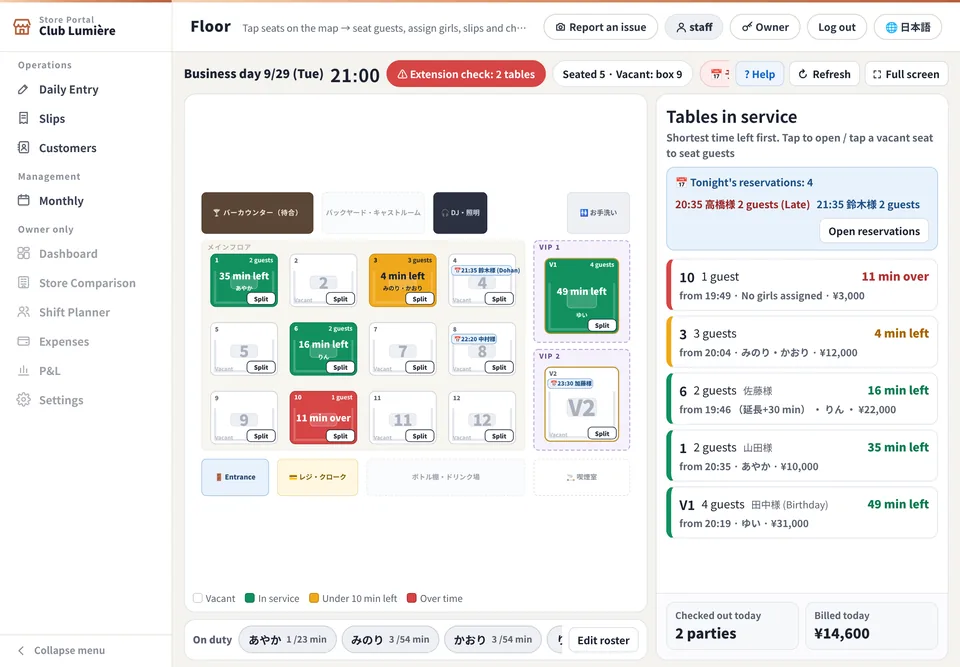
English screens are switched on per device, only for stores that turn it on. Your Japanese staff see the same screen in Japanese, while foreign cast and staff see it in English. The PIN entry screen, "Slips" and the table map all switch to English.
Only the words on the screen change. Printouts such as receipts, formal receipts and the daily sales report stay in Japanese, even when printed from an English screen. The data you have entered, such as cast members' names, stays as it is. In the demo, too, the 🌐 button at the top right switches the screens to English or Tagalog.
Cast My Page in Japanese and English
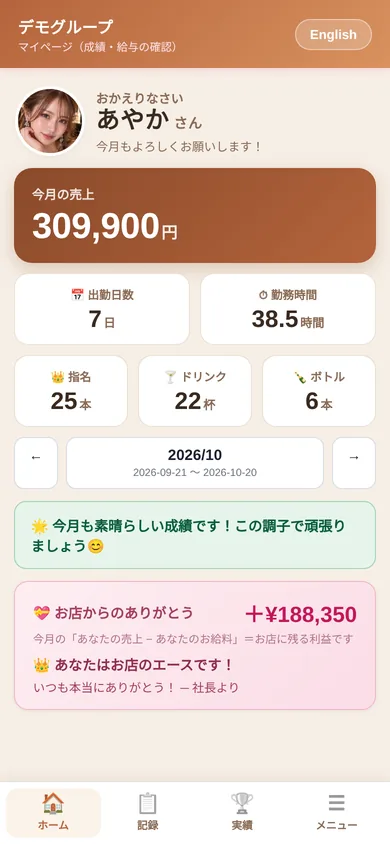
Cast members open it on their own phones with their own PIN: this month's sales, days worked, nominations, drinks and bottles with a day-by-day record, the badges they have earned, the next goal and the sales ranking (the top three and their own place). It first opens in the phone's language, and the button at the top right switches between Japanese and English.
They see only their own numbers. Other cast members' sales and pay, and the pub's profit, are not visible. The answer to "How much this month?" is something they can now see for themselves. See Cast My Page for details.
Filipino pub pricing and pay rules we can build in
At the first consultation, show us your current price list, slips and pay rules, and we build everything exactly that way (fully custom-built). For example:
- Set fees (by time and number of guests) and extensions
- Dohan, honshimei (a guest's own nominated cast member) and jounai (in-house nominations)
- Drink and bottle prices and back
- An hourly wage set for each cast member
- Different back rules from one cast member to another
- The order in which tax and service charge are applied, and rounding
- Card fees, QR payments and split payments
- Deducting daily pay advances
- Closing day (end of the month, the 20th, etc.) and pay day
- Payslips (with the withholding tax rate you set)
On closing day, payslips for every cast member
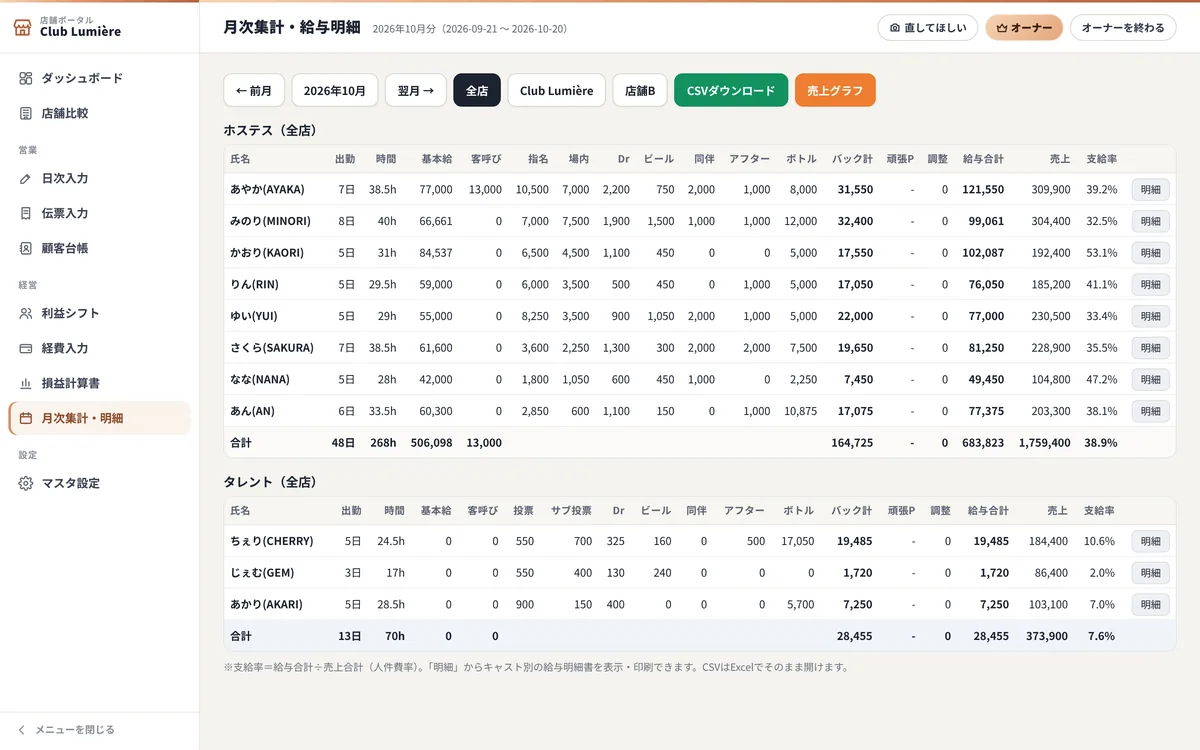
Honshimei, jounai, dohan, drinks and bottles entered on the slips become each cast member's sales and back as they are: hours worked × that person's hourly wage + back. Everyone appears in the same "Monthly" summary.
On closing day, you can print a payslip for each person as it is. Daily pay advances you have handed out can be taken off as an adjustment. The pay screens open only with the owner PIN; staff see back and sales, but no further. See Pay and back calculation for details.
Pricing for Filipino pubs
For Filipino pubs, please see the pricing on our dedicated site (Tagalog).
How we get you started
- 1
Consultation
We ask about your current price list, slips and pay rules. This is also when we go through how pay differs from one cast member to another.
- 2
Quote
It depends on the size of your pub.
- 3
Setup
The first month is a trial (¥0 if it doesn't fit). We set up your prices and pay rules, and the English screens if your pub uses them. If you use the Floor view, we also build the table map.
- 4
Training
We show your staff and cast how to use it.
- 5
Go live
It's fine to start by running it alongside your paper slips.
Ask us whether it can work the way your store does.
FAQ
QWhich screens switch to English?
The words on the store's screens switch to English: the PIN entry, "Slips", "Daily Entry", the customer book, the table map, checkout and register close. It is switched per device, so the manager's iPad can stay in Japanese while the device your foreign staff use is in English. The data you have entered, such as cast members' names, stays as it is.
QDo receipts and the daily sales report switch to English too?
No. Printouts such as receipts, formal receipts and the daily sales report stay in Japanese, even when printed from an English screen. Only the words on the screen switch to English. In the demo, the 🌐 button at the top right switches the screens to English or Tagalog.
QHow are cast members' PINs decided?
The owner sets a 4-digit PIN for each cast member in the store's settings. If a PIN is forgotten or needs changing, the owner can look it up or change it. After a change, a phone that was open with the old PIN has to enter again. The page also signs out after 30 minutes without being touched, so the PIN is entered again next time.
Can your price list and pay rules go in exactly as they are?
Just ask us.
Try it for a month; if it doesn't fit, you pay nothing. Anyone can try the demo right now (staff 1111 / owner 9999).