
Store Portal店舗ポータル 日本語

Cast My Page

Cast members checktheir sales and resultson their own phone.

The travel fee is free for the first visit only.

From the slips and working hours that staff enter, each cast member's sales and nomination, drink and bottle counts go into their My Page automatically. Cast members open it with their own PIN and see only their own figures. It works the same whether you keep your current register or take payments in Store Portal too.

  • This month's sales, shifts and nominations at a glance
  • Badges and next goals make the effort visible
  • Other cast members' sales and pay are not shown
  • No app needed. Japanese and English

Included in every plan (the features are the same at every size; only the price depends on store size) See prices

Good for

  • Stores where cast often ask for their figures before business
  • Stores with foreign cast members
  • Stores that want to stop pinning up the rankings
  • Kyabakura, girls' bars and lounges
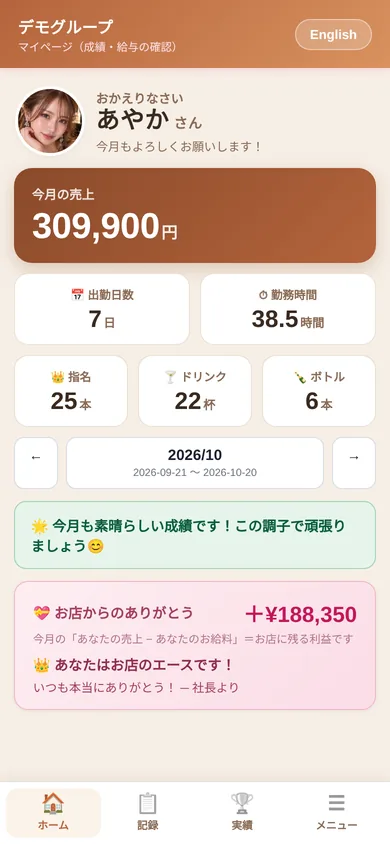
Cast My Page: this month's sales, days worked, hours, nominations, drinks and bottles (demo screen)

Demo screens are shown in Japanese. Stores can switch their screens to English on each device.

The daily chore of cast asking for their figures

When the only way to know your own figures is to ask the manager, it takes time for the one asking and the one answering.

  • Asked almost every day before business

    "Is yesterday in yet?" "How many drinks this month?" Each time, someone goes back through the slips or the notebook.

  • The effort stays invisible until pay day

    Not knowing their own sales or nomination count until month end, there is no way to set a goal.

  • Pinned-up rankings need care

    On paper on the wall, everyone's figures are on show. The ones lower down feel awkward.

  • Hard to tell foreign cast members

    With Japanese slips and notes, even reading their own figures is a struggle.

What cast members can see on My Page

Only their own figures. The tabs at the bottom of the screen (Home, Record, Results, Menu) switch between them.

  • This month's sales
  • Days worked and hours
  • Nomination, drink and bottle counts
  • Day-by-day record
  • Badges earned
  • Next goal (how many more to reach it)
  • Sales ranking (top 3 and their own rank)
  • "Thank you" cards from the store
  • Previous months' results (switch the month)

Badges, next goals and a ranking give the effort a shape

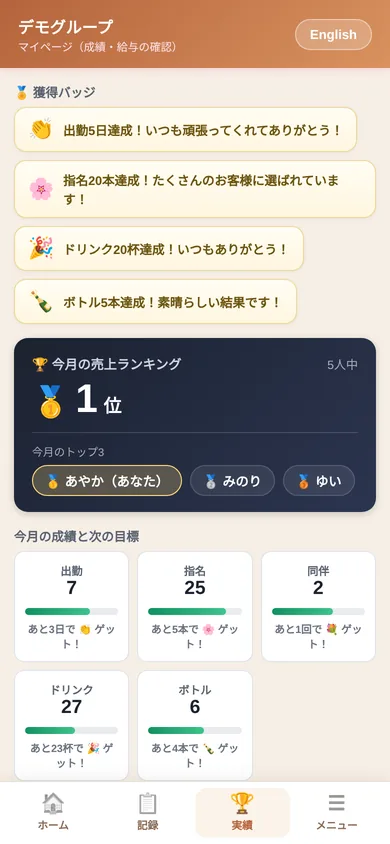
When shifts, nominations, dohan, drinks or bottles reach a set number, a badge is awarded (for example, 10 nominations). For the ones not reached yet, it shows how far to go, like "3 more to go".

The sales ranking shows only the top 3 names and the cast member's own rank. Other cast members' amounts are not shown, so those lower down are less likely to feel awkward.

My Page results: badges earned, this month's sales ranking and the next goal (demo screen)
The Results tab

My Page figures follow your store's way of counting

Store Portal is fully custom-built around your store's pricing and pay rules. How honshimei and in-house nominations are counted, how sales are split when a nomination is shared by two cast members, how drinks and bottles are counted: we ask about your current way and set it up that way. So the My Page figures match your store's calculations.

The items shown on My Page are built to your store's rules too. For hourly wage and back rules, see Pay & back calculation.

What each person sees is kept separate

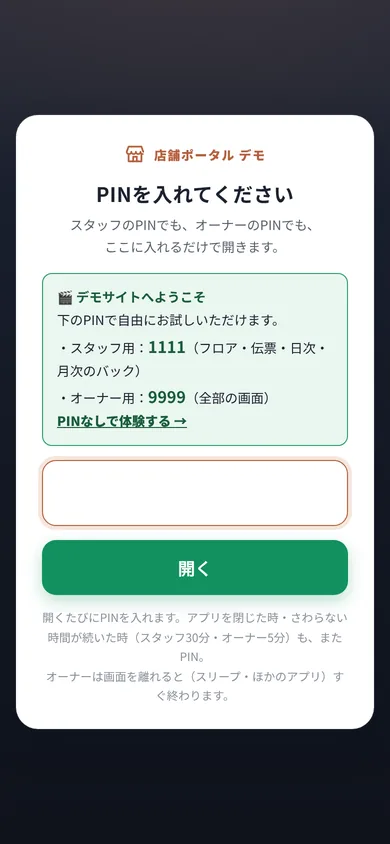
What the store's screens show depends on the PIN entered at the entrance. The staff PIN opens the back and sales figures. The pay and P&L screens open only when the owner's PIN is entered.

The cast My Page has a separate entrance. Cast members pick their own name and enter their own 4-digit PIN. Only their own figures appear: other cast members' sales and pay, and the store's overall profit, do not. After 30 minutes without use the login expires, and the PIN is needed again next time.

Entrance to the store's screens: where staff or the owner enter their PIN. The cast My Page has a separate entrance (demo screen)
Entrance to the store's screens (staff and owner). The cast My Page has its own entrance

How the figures reach My Page

  1. 1

    During and after business

    Staff enter the nominations, drinks and bottles on the slip, with the cast member they belong to. If you keep your current register, all together after business; if you take payments on the table map, from that checkout. Cast members never enter anything.

  2. 2

    After closing

    Working hours are fixed in "Daily Entry". Together with the slips, this becomes the day's record.

  3. 3

    The next day

    Cast members check their sales and nomination counts up to the day before, on their own phone. It opens from the icon on the home screen.

  4. 4

    During the month

    Seeing how far to the next goal, they know for themselves how many more to go.

  5. 5

    After the closing day

    The month, cut off at the closing day, switches over to the next month. Previous months can still be looked back on.

Pricing: My Page is included in every plan

The cast My Page is included in every Store Portal plan. The features are the same in every plan, and the price depends only on your store's size. In the demo, you can try the cast screens too. See Pricing for details.

Store Portal

Every feature. Priced only by store size

Small

Monthlyfrom ¥9,800(tax incl.)

Setup fee¥0

Small-to-medium

Monthly¥22,000(tax incl.)

Setup fee¥0

Medium-to-large

Monthly¥33,000(tax incl.)

Setup fee¥0

Larger stores

  • Large¥44,000
  • Extra-large¥55,000

a month, tax incl.

No app to install. It runs in the browser on your phone or computer

On every plan, the setup fee is ¥0. Try it for a month; if it doesn't fit, you pay nothing. The first month is the time to try it and for us to build your settings. If you continue, the monthly fee starts from month 1.

  • All prices include tax.
  • The first month is the time to try it and for us to build your settings. If it doesn't fit, you pay nothing; if you continue, the monthly fee starts from month 1.
  • The setup fee is ¥0 on every plan.
  • For small stores, only at the start of the contract, the monthly fees for months 1 to 3 are paid together in advance (monthly after that).

FAQ

QDo cast members need to install an app on their phone?
A

No. It opens in the phone's browser. Add it to the home screen and it opens from an icon like any other app.

QCan they see other cast members' sales or pay?
A

No. My Page shows only their own figures. The sales ranking shows only the top 3 names and their own rank, not other cast members' amounts. Their own pay amount and the store's overall profit are not shown on My Page either.

QDo cast members enter the figures themselves?
A

No. The figures come automatically from the slips and "Daily Entry" that staff enter. Cast members only view, so there is no entry work for them.

QIs it OK for cast members who read only English?
A

Yes. The screen can be shown in Japanese or English. It first opens in the phone's language, and when you switch with the button at the top right, the device remembers the choice.

QWhat if a cast member forgets their PIN, or wants to change it?
A

The owner can check or change a cast member's PIN in the store's settings. After a change, devices that were logged in with the old PIN have to log in again.

Can your price list and pay rules go in exactly as they are?
Just ask us.

Try it for a month; if it doesn't fit, you pay nothing. Anyone can try the demo right now (staff 1111 / owner 9999).